
📑 On this page
Long hours at a desk are common in Singapore’s work culture – and so are the aches that come with them. In a study of musculoskeletal disorders among local office workers reported by Singapore General Hospital, 73% of the 324 people surveyed said they had pain in at least one body area; the areas named most often were the neck (46%), the shoulders (42%) and the lower back (42%). The same SingHealth page notes that many office workers sit at the edge of their chairs, which leaves the back without support.
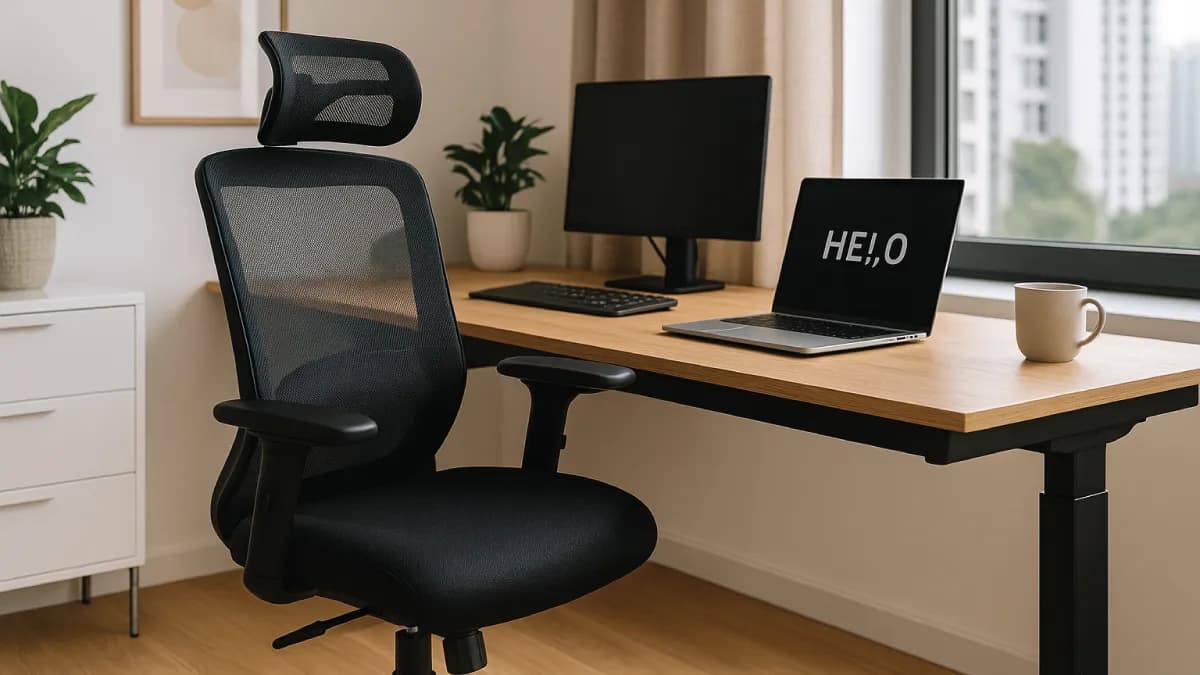
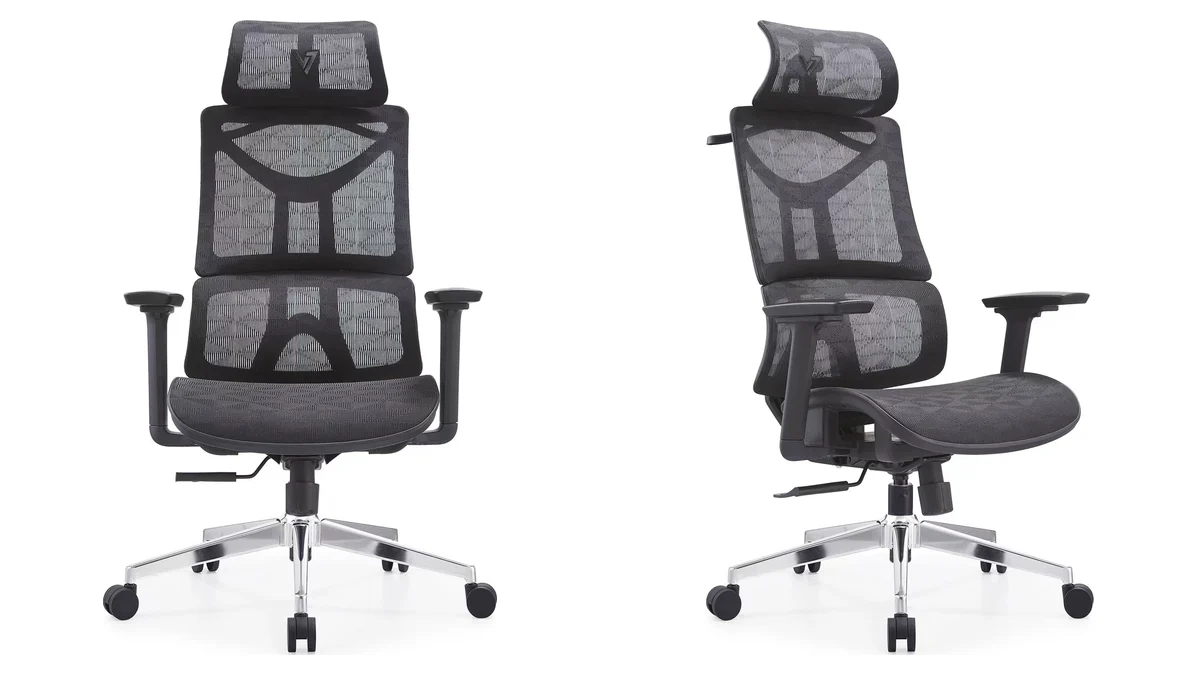
It is worth being straight about what a better chair can do about that. A systematic review of workplace chair interventions (van Niekerk, Louw & Hillier, BMC Musculoskeletal Disorders, 2012) found “a consistent trend that supports the role of a chair intervention to reduce musculoskeletal symptoms among workers who are required to sit for prolonged periods” – while stating in the very same conclusion that “the amount, level and quality of the evidence are only moderate”. A good chair helps. It is not a cure, and anyone selling you one as a cure is overselling it. Esmond Service Centre repairs laptops, not chairs, so this guide covers both halves of a laptop desk: how to choose and adjust an ergonomic work chair, from the guidance of Singapore’s WSH Council, Singapore General Hospital and the UK Health and Safety Executive (HSE); and what a laptop needs that no chair can give it, from the laptop makers’ own instructions. (Esmond Service Centre is also the Singapore distributor for Vival, a homegrown ergonomic furniture brand; the chair in the photographs below is Vival’s.)
Prioritize Ergonomics When Choosing a Work Chair
The issue: A chair you cannot adjust – or one you never adjust – makes you fit yourself around it: perched on the front edge with no support for your back, shoulders raised, neck bent towards the screen. Those are the postures a Singapore General Hospital occupational therapy page describes in office workers, and the UK HSE names bad seating, and chair arm rests that stop you getting close enough to the desk, among the possible causes of poor posture at a computer.
The solution: Choose a chair you can adjust, then adjust it. The WSH Council’s 2014 guidelines on ergonomics, published with the Ministry of Manpower, call for a chair that is stable and adjustable, with armrests and a backrest, and their checklist asks whether the chair’s height adjusts, whether its back rest reclines slightly, whether the seat pan suits you, whether the armrests adjust and whether it stands on five legs with castors and swivels. Check these five points when choosing the best chair for work:
- Back support where your back curves: Singapore General Hospital’s guidance is to set the back support to rest at the curve of the lower back, then move the backrest forward or back until it presses comfortably on your lower back in your usual working position – it should not push you out of the seat, nor make you lean back too far to reach it. A back support you can raise or lower lets you put it where your own curve is.
- Seat height and seat depth: The seat should adjust so that your feet rest flat with your thighs roughly horizontal; the WSH Council’s guidelines give a chair height of 35–50 cm. Check the depth as well: sitting fully back, you should have a gap of 2–3 cm (UK HSE) or two fingers (Singapore General Hospital) between the front edge of the seat and the back of your knees. A seat that is too deep presses its edge into the backs of your legs – the pressure the HSE says to avoid.
- Armrests that adjust, or keep out of the way: The WSH Council’s checklist asks whether the height of the armrests can be adjusted. Too high, they lift your shoulders; too low, you tilt your body to rest your arms on them (Singapore General Hospital). And chair arms can stop you getting close enough to the desk, the HSE warns – if yours do, lower them or work without them.
- A back rest that reclines slightly: The WSH Council’s checklist asks whether the back rest reclines slightly, to between 100° and 120°, and a Singapore General Hospital occupational therapist’s summary of the Singapore Standard for office ergonomics, SS 514, gives the same range, to reduce the pressure on the spine. Check that the back rest holds the angle you set.
- Five castors, a swivel and adjustments you can reach: The same checklist asks whether the chair has five legs with castors and can swivel, and whether all its adjustments are easy to access and operate. Try every lever from the seat before you buy.
Why it works: Adjustment is what lets one chair fit people of different sizes: the WSH Council’s guidelines ask for workstations designed to suit the height and reach of all or most employees. It is also the repair-side test of any ergonomic work chair. The UK HSE’s workstation checklist says a chair may need repairing or replacing if the user is uncomfortable or cannot use its adjustment mechanisms – so a seat that sinks, a back rest that will not lock or a castor that drags means the chair no longer fits you, whatever it cost. Those faults go to the chair’s seller or maker: Esmond Service Centre does not repair chairs.
Adjust Your Work Chair in Five Steps
The issue: An adjustable chair only helps once it has been adjusted, and the order matters. The UK HSE’s checklist adjusts the chair height first, to get your arms in the right position, and only then the screen height; Singapore General Hospital likewise adjusts the chair to your body before the desk and the monitor. Work through the steps below in that order.
Seat Height
Raise or lower the seat until your feet rest flat on the floor, your thighs are roughly horizontal and your lower legs roughly vertical (Singapore General Hospital). At the keyboard, your forearms should be approximately horizontal (UK HSE). (If your desk is too high and raising the chair leaves your feet dangling, add a footrest – Singapore General Hospital and the HSE both suggest one.)Seat Depth & Back Position
Sit with your hips as far back in the seat as they will go – the WSH Council’s advice, so that your hips are fully supported. Then check the front edge: there should be a gap of 2–3 cm (HSE) or two fingers (Singapore General Hospital) between it and the back of your knees. If the chair has a sliding seat pan, slide it to get that gap; if the edge still presses into the backs of your legs, the seat is too deep for you.Lumbar Support & Backrest
Set the back support to rest at the curve of your lower back, then move it forward or back until it presses comfortably there in your usual working position; it should not push you out of the seat or make you lean back too far to reach it (Singapore General Hospital). Then recline the back rest slightly: the WSH Council’s checklist gives 100° to 120°.Armrests
Set the armrests so that resting your arms on them neither lifts your shoulders nor makes you tilt your body to reach them (Singapore General Hospital). If they stop you pulling in close to the desk, lower them or take them off: Singapore General Hospital notes that armrests are usually not essential unless they are well out of the way of the desk.Screen, Keyboard and Breaks
Only now set the screen: its top level with your eyes or slightly lower, about an arm’s length away, with the keyboard just below elbow height (UK HSE; Singapore General Hospital). A laptop cannot meet both heights at once, because its screen is joined to its keyboard – so raise the laptop and use a separate keyboard and mouse (see the laptop section below). Then get up regularly: the HSE says short breaks taken often, for example 5 to 10 minutes every hour, are better than 20 minutes every 2 hours.
Why it works: The steps run from the floor up because each depends on the one before: the seat height sets where your arms meet the keyboard, and only then can the screen be placed for your eyes. None of it is meant to hold you still all day. Singapore General Hospital advises a break from sitting every 30 minutes, and HealthHub, the Ministry of Health’s health portal, says there is no single best posture to prevent low back pain – so set the chair up well, then keep changing position.
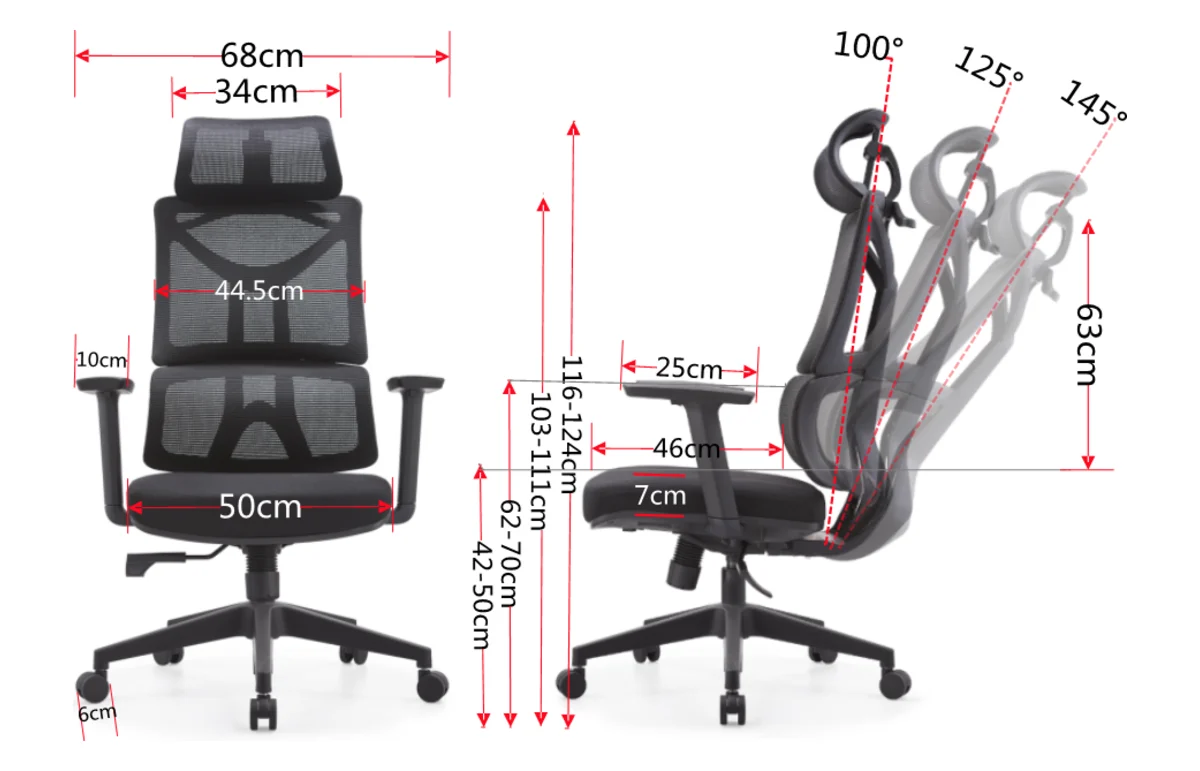
For reference, against the numbers above: the Vival chair drawn here sets its seat between 42 cm and 50 cm off the floor, has a 46 cm seat depth with a 7 cm sliding pan for the gap behind your knees, gives the armrests 10 cm of height travel, locks the backrest at 100°, 125° or 145°, and stands 68 cm wide overall — worth checking against your own desk before you commit to any chair, this one included.
Which Materials and Build Make an Ergonomic Work Chair Last in Singapore?
The issue: A chair keeps fitting you only while its adjustments keep working, and in a room without air-conditioning its seat and back material matters as well. A seat that no longer holds its height or a back rest that no longer locks takes away the adjustment you bought the chair for – and the HSE’s checklist treats a chair whose adjustment mechanisms cannot be used as one that may need repairing or replacing.
The solution: Choose the materials for the room the chair will live in, and test the build before you pay. Check these five things:
- Seat and back material: Mesh lets air through to your back, which matters most in a room without air-conditioning; a padded fabric, leather or vinyl back lets less air through. Whatever the material, sit on it for a while: you should not sink through the cushion to a hard base, and a mesh back should not sag away from your lower back.
- The parts that move: Sit, then work every adjustment: the seat should rise, lower and hold its height; the back rest should recline and stay where you lock it; the armrests should move and stay put; every castor should roll freely. A chair that cannot hold those settings has stopped being adjustable.
- Stability: The HSE’s workstation checklist asks whether the chair is suitable and whether it is stable, and the WSH Council’s checklist asks whether it has five legs with castors. Lean back and reach to the side as you would at work: the chair should not rock or tip.
- The warranty, and who repairs the chair: Read what the warranty covers – frame, base, gas lift, tilt mechanism, mesh or foam, armrests – and for how long, and ask who carries out warranty repairs in Singapore. Esmond Service Centre repairs laptops, not chairs, so a chair fault goes back to the chair’s seller or maker.
- Try before you buy: If possible, sit in the chair at a showroom and adjust it to yourself first. A chair that looks best on paper still has to fit your height and your desk – and if you work on a laptop, plan for a stand and a separate keyboard as well (see below).
Why it works: An ergonomic work chair is only as good as its adjustments, and adjustments are moving parts. Choosing materials for your room and checking the mechanisms, the stability and the warranty before you buy is what keeps the fit you set on the first day. If the chair later stops holding its settings, have it repaired or replaced through its seller or maker – the step the HSE’s checklist points to for a chair whose adjustments can no longer be used.
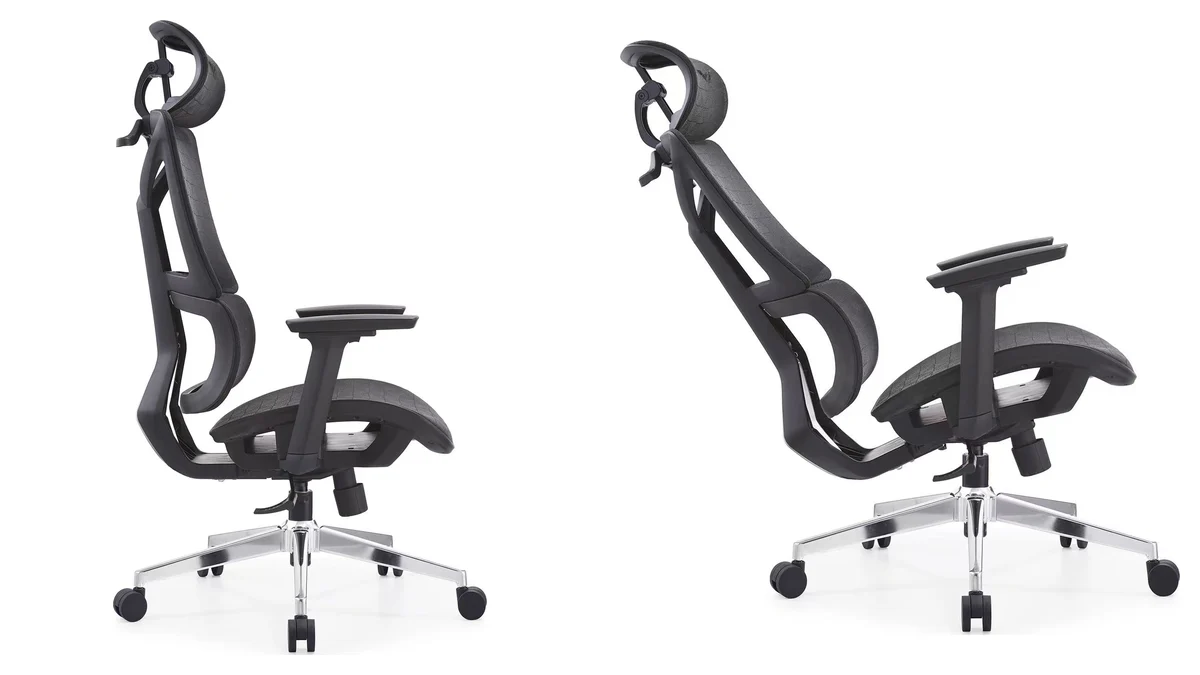
What No Work Chair Can Fix: Your Laptop’s Screen, Heat and Spills
The issue: A chair can rise, tilt and recline – the photograph shows how far this one’s backrest travels – but it cannot move a laptop’s screen. The screen is joined to the keyboard, so with the keyboard at a comfortable typing height on a desk, the screen sits well below your eyes and your head bends forward to read it. The authors of a 2021 laptop study put the risk plainly: laptop work may increase the risk of neck and back injuries in the long term, through awkward postures and higher loads on the neck and lower back.
The solution: Four changes do what the chair cannot – two for your neck and hands, two for the laptop itself:
- Raise the screen: Put the laptop on a stand or riser so that the top of the screen is level with your eyes, about an arm’s length away. The UK HSE notes that raiser blocks are commonly used to help with a laptop’s screen height.
- Type on a separate keyboard and mouse: With the screen raised, the laptop’s own keyboard is too high to type on, so plug in a full-sized keyboard and mouse and keep them just below elbow height – the HSE’s setup for prolonged laptop use. In a 2021 laboratory study of 20 young men, raising the screen on a riser and connecting an external keyboard reduced how far the neck and upper back bent forward, lowered the activity of two of the spinal muscles measured, and lowered discomfort, comparing two 8-minute sessions of typing and mouse work.
- Keep it on a hard, flat surface: Lenovo’s user guide for one of its laptops explains that the air vents let hot air out, and says not to place the laptop on a bed, sofa, carpet or other flexible surface while it is operating: the vents will be blocked and it may overheat, slow down, stop responding or even shut down. Apple likewise says not to use a Mac laptop in bed, on a pillow or under bedding.
- Keep drinks away, and know the first step after a spill: Apple’s own troubleshooting guide notes that contact with liquid can short internal circuits and cause fans to stop working. Lenovo’s first instruction after a spill is to unplug the power adapter and turn the laptop off immediately – you might lose some data or work, but leaving it on might make it unusable – and not to switch it on again until you are certain all the liquid is dry.
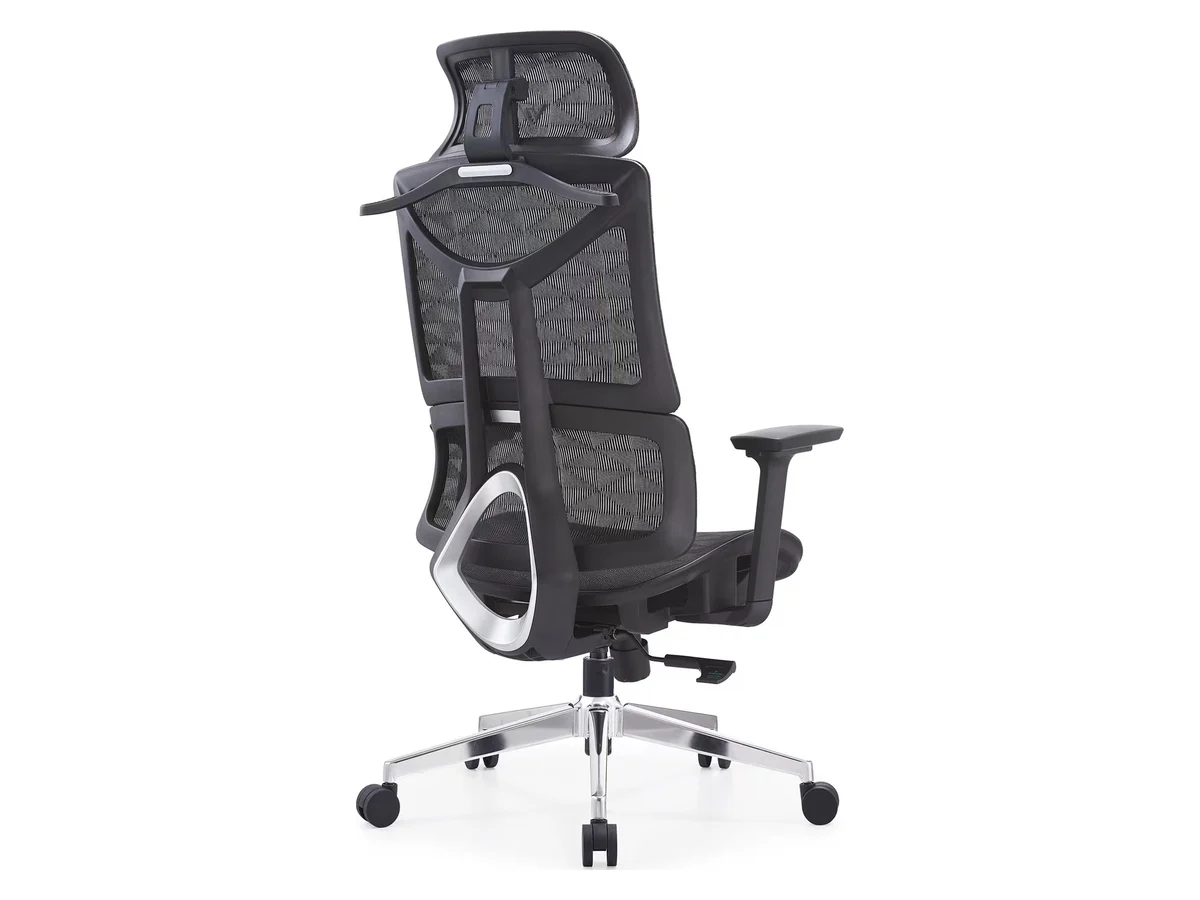
There is one more fixed height at a laptop desk: the desk itself. Singapore General Hospital puts the top of the desk just below elbow height; if yours is too high, its advice is to raise the chair, with a footrest if your feet are then left dangling. The WSH Council’s guidelines say to adjust the height of the working surface to suit the person using it. A height-adjustable desk does that directly and lets you alternate between sitting and standing. Esmond Service Centre is the Singapore distributor for Vival, whose Vival Desk is a dual-motor standing desk with a 120 × 60 cm top and a 1-year warranty – the full terms are on our Vival warranty policy, and Vival’s own site is projectvival.com. To set a whole desk, screen and laptop to your height, see our ergonomic desk guide. Vival also makes the ergonomic chair photographed in this guide – a mesh-backed task chair with an adjustable headrest, height-adjustable armrests and a three-stage recline. Esmond Service Centre is its Singapore distributor; ask us about its price and availability.
Why it works: Raising the screen and separating the keyboard let the chair do its job: you can sit back against the backrest with your eyes level with the screen, instead of leaning in to a low one. A hard surface and a dry desk protect the machine itself. Apple notes that a laptop may run hotter and louder during heavier use, and that this is normal. But if it overheats or shuts down on a hard, flat surface at light work, or liquid has got inside, that is our side of the desk: see laptop overheating and fan repair and laptop water damage repair. Where liquid has caused several failures at once, we will advise you against repairing it; either way, our laptop repair service starts with a free diagnosis.
When to Stop Adjusting and Get Professional Help
A chair fixes a setup problem. It cannot fix a medical one, and it cannot fix a faulty laptop – knowing where each line falls will save you both money and time.
- See a doctor, not a showroom, if the pain does not improve after rest or pain medication – and urgently if it comes with worsening numbness, weakness or tingling, numbness or tingling in your legs or private area, or a change in urinary or bowel control. Those are among the warning signs HealthHub lists for neck and low back pain, and no seat pan will fix them. HealthHub adds that in most cases the pain should improve in 6 weeks; see a doctor if it gets worse.
- Measure before you shop if you already have an adjustable chair and are still sore. Check your seat, desk and screen heights against the steps above: the fix may be a footrest, a raised screen or a separate keyboard rather than a new chair.
- It is not the chair if the ache is in your wrists or your eyes. Keep your wrists straight when typing and the mouse within easy reach, and look into the distance from time to time and blink often, as the UK HSE advises; the HSE also notes there is no evidence that screen work will cause permanent damage to eyes or eyesight.
- It is the laptop if it runs hot, slows down or shuts itself off on a hard, flat surface, if its fans run for a long time when it is doing little, or after any spill. If a Mac laptop gets warm when it is not doing intensive work, or its fans run for a long time, Apple’s advice is to check CPU activity in Activity Monitor for a malfunctioning process putting a heavy load on the processor. After a spill, or if software is not the cause, our laptop repair service starts with a free diagnosis.
Key Takeaways for Choosing the Best Chair for Work
In short, from choosing the chair to protecting the laptop on the desk:
- Choose for adjustment: a seat whose height adjusts, a back rest that reclines slightly (100° to 120° on the WSH Council’s checklist), a seat pan you can sit fully back in, armrests that adjust or keep out of the way, and a stable base on five castors.
- Adjust in order: seat height and feet first, then the seat depth (a 2–3 cm gap behind your knees), the back support at the curve of your lower back and the armrests – and only then the screen and keyboard. Then get up regularly; no chair replaces breaks.
- Raise the laptop, separate the keyboard: a laptop on a desk leaves its screen too low for any chair to fix; a stand with a separate keyboard and mouse fixes it.
- Protect the laptop: keep it on a hard, flat surface rather than a bed or sofa, and keep drinks away from it. A chair fault goes to the chair’s seller or maker; a laptop that overheats or has had a spill comes to us.
If you work on a laptop all day, the chair is only half of the setup: fit the chair to your body, then fit the laptop to your eyes and hands. And if the laptop itself is overheating, slowing down or has had a drink spilled on it, bring it to Esmond Service Centre – laptop diagnosis is free.
Follow Esmond Service Centre
For more practical tips, follow Esmond Service Centre on Facebook, LinkedIn or Instagram. For the laptop side of the desk in more depth, see our pages on laptop fan cleaning and what to do after spilling water on a laptop.

Esmond Service Centre's experienced technicians can diagnose and fix it fast — free diagnostics, repairs from $65.