Find Dell Laptop Service Tag

The Dell Service Tag is your laptop’s serial number.
How to find it:
- Look for a sticker at the bottom of your Dell laptop labeled Service Tag.
- If the sticker is missing, tap F2 during startup to enter BIOS. The Service Tag will be listed on the BIOS main screen.
- You can also open Command Prompt (Windows key + R → type
cmd) and type:
wmic bios get serialnumber - Alternatively, Dell’s SupportAssist app can auto-detect it.
Find HP Laptop Model and Serial Number

HP laptops usually display both the serial number and model number directly on the device.
How to find it:
- Flip your HP laptop over and look for a label showing the Serial Number (S/N) and Product Name (this is the model number).
- For older HP laptops with removable batteries, you need to shut down the laptop, remove the battery, and check underneath the battery compartment to find the serial and model numbers.
- If no external label is visible, restart your laptop, press Esc, then press F1 to access the System Information page. Both the serial number and model name will be displayed there.
- Using PowerShell (press Windows Key + R, type
powershell, then Enter):- Serial number:
Get-CimInstance -ClassName Win32_BIOS | Select-Object -ExpandProperty SerialNumber - Model number:
Get-CimInstance -ClassName Win32_ComputerSystem | Select-Object -ExpandProperty Model
The older wmic bios get serialnumber still works on Windows 10 and on early Windows 11 builds, but Microsoft has deprecated WMIC and is removing it from Windows, so on newer builds it returns “not recognized”.
Find Lenovo Laptop Serial Number

Lenovo laptops usually have a visible serial number label.
How to find it:
- Check the bottom cover of your Lenovo laptop for a sticker labeled Serial Number.
- For ThinkPad models, if your battery is removable, power off the laptop and remove the battery. The serial number is printed underneath the battery area.
- Using BIOS, restart your laptop and press F1 during startup to enter the BIOS menu where the serial number will be listed.
- Using Command Prompt, you can also run
wmic bios get serialnumber to retrieve the serial number inside Windows.
Find Asus Laptop Model Number

Asus laptops typically display the model number on the device casing.
How to find it:
- Flip your Asus laptop over and check for a label showing the Model Number (e.g., X515EA, ROG G14).
- If the label is missing, restart the laptop and press F2 to enter BIOS, where the model name will be listed.
- In Windows, you can press Windows Key + R, type
dxdiag, and find the model number under "System Model."
Find Acer Laptop Model Number

Acer laptops make it simple to locate the model number.
How to find it:
- Check the underside of your Acer laptop for a sticker labeled Model Number.
Common examples include models like Aspire 5 A515-56, Swift 3 SF314-511, or Predator Helios 300 PH315-54. - If the sticker is faded or missing, restart your laptop and press F2 during boot to enter the BIOS. The model and product name will be displayed there.
- In Windows, you can use the Acer Care Center app to detect and display your laptop’s model information automatically.
- Using PowerShell, you can also find the model number:
- Press Windows Key + R, type
powershell, and hit Enter. - Run
Get-CimInstance -ClassName Win32_ComputerSystem | Select-Object -ExpandProperty Model and press Enter. - Your laptop model number will appear on the screen.
The older wmic computersystem get model command is deprecated by Microsoft and may not run on newer Windows 11 builds.
Find MSI Laptop Serial Number

MSI laptops often separate the serial number and model name.
How to find it:
- Look underneath your MSI laptop for a sticker labeled S/N — this is your serial number.
Common examples of MSI serial numbers look like S/N: K2103N0012345 or S/N: D8N-123ABC456789. - Using BIOS, restart your MSI laptop, press Delete during boot-up, and check the BIOS main screen for the serial number.
- Alternatively, you can open the MSI Dragon Center or MSI Center application, go to device information, and view the serial number there.
Find MSI Monitor Serial Number

MSI monitors typically have the serial number printed on a label located at the back of the device.
✅ Look for a sticker labeled S/N
- Turn your monitor around and check the back casing or lower rear panel.
- The serial number usually starts with S/N: followed by a combination of letters and numbers.
- Examples:
Find Razer Laptop Model Number
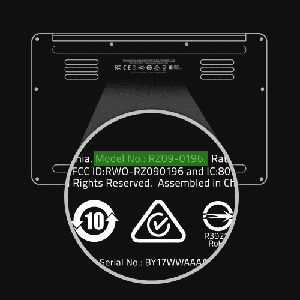
Razer laptops display the model number differently depending on the series.
How to find it:
- Check the bottom of your Razer laptop for a label starting with "RZ09-" followed by numbers.
Common examples of Razer model numbers include RZ09-0409 (Razer Blade 15) or RZ09-0482 (Razer Blade 14). - If the label is faded or missing, restart your laptop and press F1 during startup to enter the BIOS screen, where model information is displayed.
- Razer Synapse software can also automatically detect and display your device’s model information under system settings.
Find MacBook Model Number
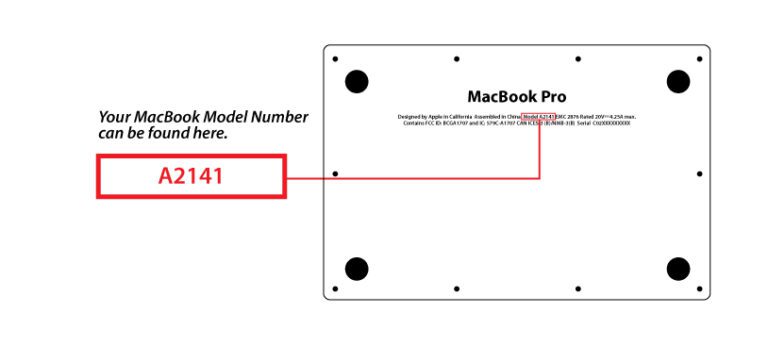
Apple MacBooks have model information both physically and within macOS.
How to find it:
- Click the Apple Menu, then select About This Mac. Your model name and serial number will appear in the overview tab.
- Alternatively, check the fine print underneath your MacBook near the hinge for the model identifier (e.g., A2338, A2681).
- For detailed model info, open System Information and navigate to "Hardware Overview" to see the model identifier and serial number.
Find Microsoft Surface Model and Serial Number
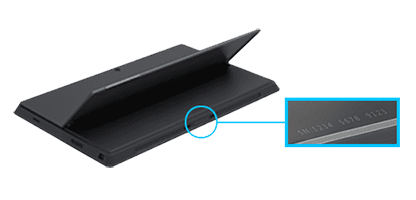
Microsoft Surface devices display model and serial information differently based on the design.
How to find it:
- On Surface Pro and Surface Go devices, flip open the kickstand to find the serial number printed underneath.
- On Surface Laptop and Surface Book models, check the area underneath the keyboard or along the bottom panel.
- In Windows Settings, go to Settings > System > About to view your Surface’s model name and serial number.
- You can also use the Surface App, available through the Microsoft Store, to auto-detect your device model and warranty status.