

📑 On this page
In June 2025 the Qantas Group announced the closure of Jetstar Asia, its Singapore-based low-cost subsidiary. The airline flew a progressively reduced schedule for seven weeks before its final day of operation on 31 July 2025, ending 16 intra-Asia routes out of Singapore, and its 13 Airbus A320s were progressively redeployed to Australia and New Zealand. Qantas put a number on what the wind-down returned: the closure would recycle up to A$500 million in capital into its fleet renewal programme. ⭐ That is the part worth borrowing whatever your size — retiring assets deliberately is not only a cost, it is a recovery. Only the Singapore subsidiary closed; Jetstar Airways in Australia and New Zealand and Jetstar Japan were unaffected and still operate. Even so, the speed of it caught many Southeast Asian businesses by surprise, and a sudden operational change is exactly when technology assets and IT continuity get overlooked.
Obsolete computers and electronics piled up, awaiting proper retirement and recycling. Many businesses eventually face a closet full of obsolete devices – aging laptops, desktops, and servers that no longer meet needs. Properly retiring this old hardware isn’t just about freeing storage space; it’s crucial for data security and sustainability. With over 16 years of industry experience, our team at Esmond Service Centre (a leading IT service provider trusted by global tech brands and enterprises) has guided countless companies through safe tech refresh cycles. In this comprehensive guide, we share practical steps to evaluate which equipment is truly obsolete, securely wipe sensitive data, decommission hardware correctly, and recycle or repurpose electronics to minimize e-waste. By following these best practices, you’ll protect your business from data leaks and contribute to a greener planet – all while smoothly transitioning to updated technology.
Managing Asset Lifecycles After Jetstar Asia’s Example
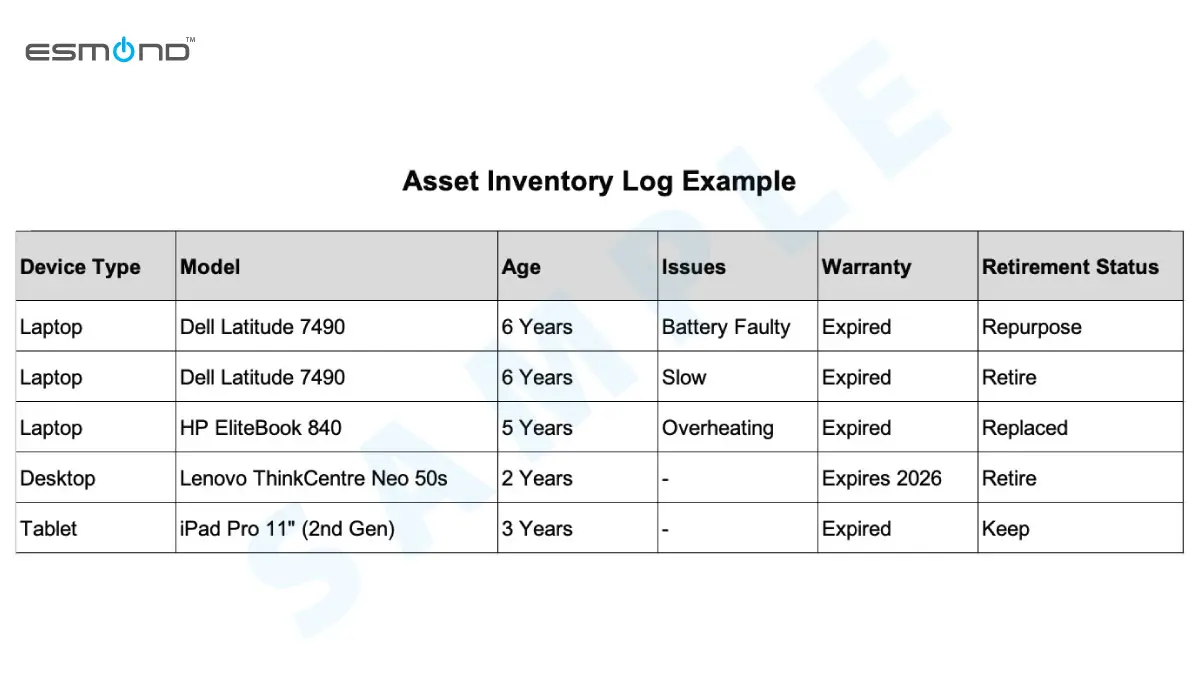
Jetstar Asia's decision to wind down highlights the importance of systematically managing IT assets. Before disposing of anything, take a systematic look at your inventory of IT assets. Start by cataloguing all devices and their details – model, age, performance issues, warranties, etc. Maintaining a hardware log helps you track which items have been decommissioned or are due for retirement. Identify obsolete devices by criteria such as: no longer receiving software updates, unable to run current applications, frequent breakdowns, or high maintenance costs. For example, a 7-year-old server out of warranty and struggling with new software is a prime retirement candidate. Plan a retirement roadmap – prioritize devices posing security risks (e.g. running outdated OS) and those affecting productivity. Also decide if each device will be retired completely or repurposed: some “obsolete” computers might still serve in less demanding roles (like a spare PC for interns or a dedicated print server) if they can be upgraded cheaply (additional RAM or an SSD). Crucially, schedule the rollout of replacement equipment before retiring old units to avoid downtime. By evaluating and planning ahead — exactly what an orderly wind-down demands — businesses retire obsolete devices at the right time, preventing surprise failures and budget shocks.
| Checklist | Action Steps |
|---|---|
| Catalogue Devices | Log models, age, warranty, and issues |
| Identify Obsolete Equipment | Outdated software, frequent breakdowns |
| Prioritize Retirement | Address security risks, productivity impact |
| Repurpose Potential | Upgrade cheaply for less demanding roles |
| Schedule Replacement | Ensure new devices are ready before retiring old |
Securing Data During Unexpected Business Changes: Lessons from Jetstar Asia
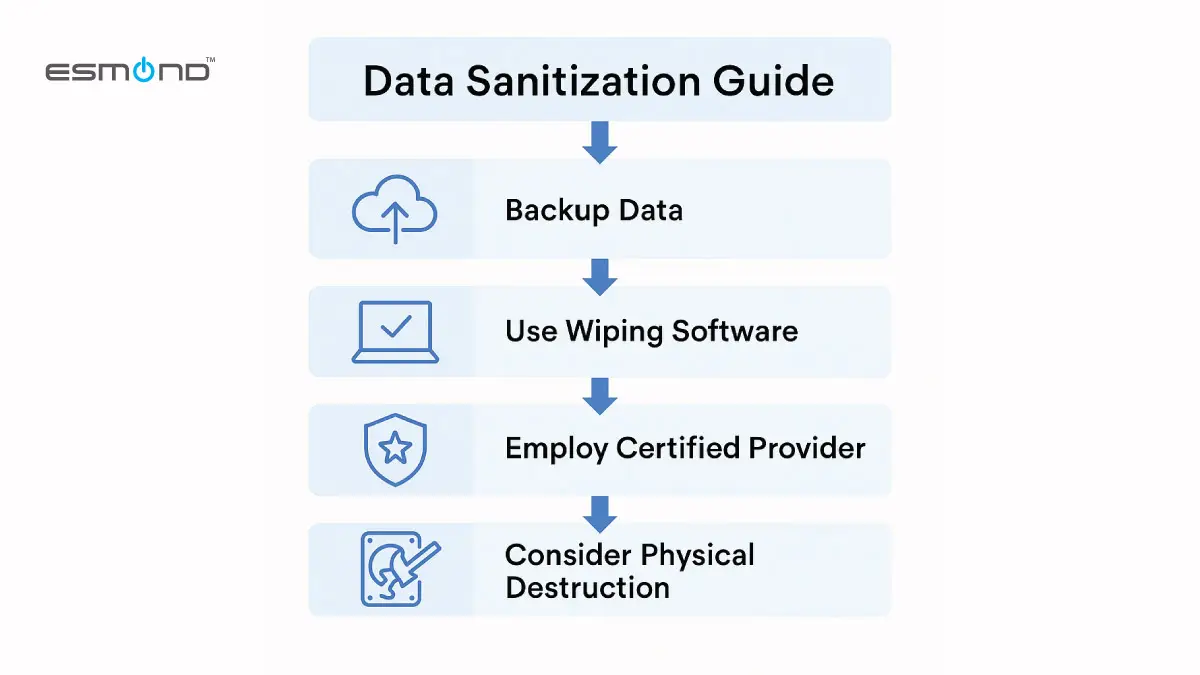
Once you’ve tagged certain PCs or servers as obsolete, protect your data before they leave your hands. Begin with a full data backup of any files or configurations you might still need. Next, remove all sensitive information from the device. It’s not enough to simply delete files or do a factory reset – on most computers this does not actually erase the data on the drive. Instead, use professional data sanitization software or services to securely wipe the drives. The recognised guideline is NIST Special Publication 800-88, Guidelines for Media Sanitization, which defines three levels — Clear, Purge and Destroy — and tells you to match the method to the drive. On a traditional magnetic hard disk, overwriting works. On the SSDs fitted to most business laptops today it does not: NIST warns that spare cells and wear levelling “make it infeasible for a user to sanitize all previous data using this approach”, so an SSD needs its own built-in sanitize command (a block erase) or a cryptographic erase. The multi-pass “DoD 5220.22-M” wipe that many tools still advertise is obsolete — NIST notes the US Department of Defense removed overwriting specifications from that manual back in 2006.
If your team isn’t comfortable doing this in-house, work with a trusted IT disposal partner who can wipe the data for you and verify it’s gone. For example, Esmond Service Centre offers certified data wiping services that completely erase drives, giving you peace of mind before recycling. In cases of extremely sensitive data (say, customer financial records), you might opt for physical destruction of storage media (shredding or degaussing drives) in addition to wiping. However, note that destroying hardware outright creates e-waste and doesn’t guarantee data can’t be pieced together by experts.
The safest approach is a thorough digital wipe followed by proper disposal. In Singapore this is more than good practice: the Personal Data Protection Act's Protection Obligation (section 24) requires organisations to make reasonable security arrangements against the unauthorised disposal of personal data, and against the loss of any storage medium or device on which personal data is stored — which is precisely what a retired laptop is. By systematically sanitizing each obsolete device, businesses shield themselves from data breaches and fulfil their obligations.
What a certified wipe will and will not do for you. Done properly it makes the data on that drive unrecoverable, and it gives you a certificate you can put in front of an auditor. What it will not fix is anything that already left the device: a wipe cannot undo a copy sitting in someone's personal cloud account, a backup you forgot you were paying for, or an email already sent. It also will not recover a file you failed to back up first — sanitisation is deliberately irreversible, which is the whole point of it. And it does nothing about the accounts the machine could still reach: revoking access, licences and MDM enrolment is a separate job, and skipping it is how a decommissioned laptop stays logged in to something.
| Action | Recommended Steps |
|---|---|
| Backup Data | Secure all necessary files and configurations |
| Data Sanitization | Sanitise to NIST SP 800-88 (Clear / Purge / Destroy) |
| Trusted Disposal Partner | Engage professionals (e.g., Esmond Service Centre) |
| Physical Destruction | Consider shredding/degaussing for highly sensitive data |
| Proper Disposal | Combine thorough data wipe and responsible recycling |
Proper Hardware Decommissioning and Documentation
Jetstar Asia’s 2025 wind-down is a reminder of how much rides on properly decommissioning IT hardware. After securely wiping your data, proceed systematically to decommission the hardware. Disconnect each device from your business systems: remove it from your network, revoke any associated access privileges or credentials (such as remote management tools), and sign out of all linked company accounts. If devices were integrated with software or cloud services, transfer or deactivate licenses to avoid unnecessary ongoing costs—particularly crucial for a business winding down or restructuring.
Physically label or isolate the hardware clearly as “Decommissioned” to prevent accidental reuse or confusion. Update your asset inventory log meticulously with details such as the retirement date, method, and destination for disposal (e.g., “Recycled via an NEA-licensed e-waste recycler on 2026-03-14”). Proper documentation is critical for maintaining organization and essential for compliance audits—especially valuable during business transitions similar to Jetstar Asia’s, when record accuracy and accountability matter greatly.
When disposing of multiple assets, consider creating a numbered manifest for easy tracking. Arrange secure, tracked, and insured transportation to the disposal facility, verifying safe handling from your premises through final disposal. Upon handover, request detailed receipts or certificates of destruction and data erasure, providing final confirmation of proper disposal.
Effective hardware decommissioning, thorough documentation, and clear procedures ensure businesses like Jetstar Asia avoid future liabilities from forgotten assets or data breaches, maintaining clarity and security during periods of operational change.
Repurposing or Recycling Obsolete Devices to Minimize E-Waste – Key Considerations Amid Jetstar Asia's Transition
In light of Jetstar Asia’s 2025 closure, responsibly managing obsolete hardware to minimize e-waste is particularly critical. Not all retired devices need to be discarded outright—often there’s a viable second life or a responsible recycling path. Begin by assessing if obsolete devices can be repurposed within your organization. For instance, an outdated desktop PC might be insufficient for an airline's intensive operational demands but perfectly adequate for less resource-intensive tasks like basic administrative functions or backup systems. Refurbishing and reallocating hardware internally maximizes its useful lifespan, delays unnecessary spending, and supports smoother transitions during periods of business restructuring like Jetstar Asia’s.
Donating functional devices to charities, educational institutions, or startups with lighter computing requirements is another excellent option. Jetstar Asia and similar businesses can leverage such donations to build community goodwill and foster positive relationships, ensuring all donated or reassigned devices undergo thorough data-wiping beforehand.
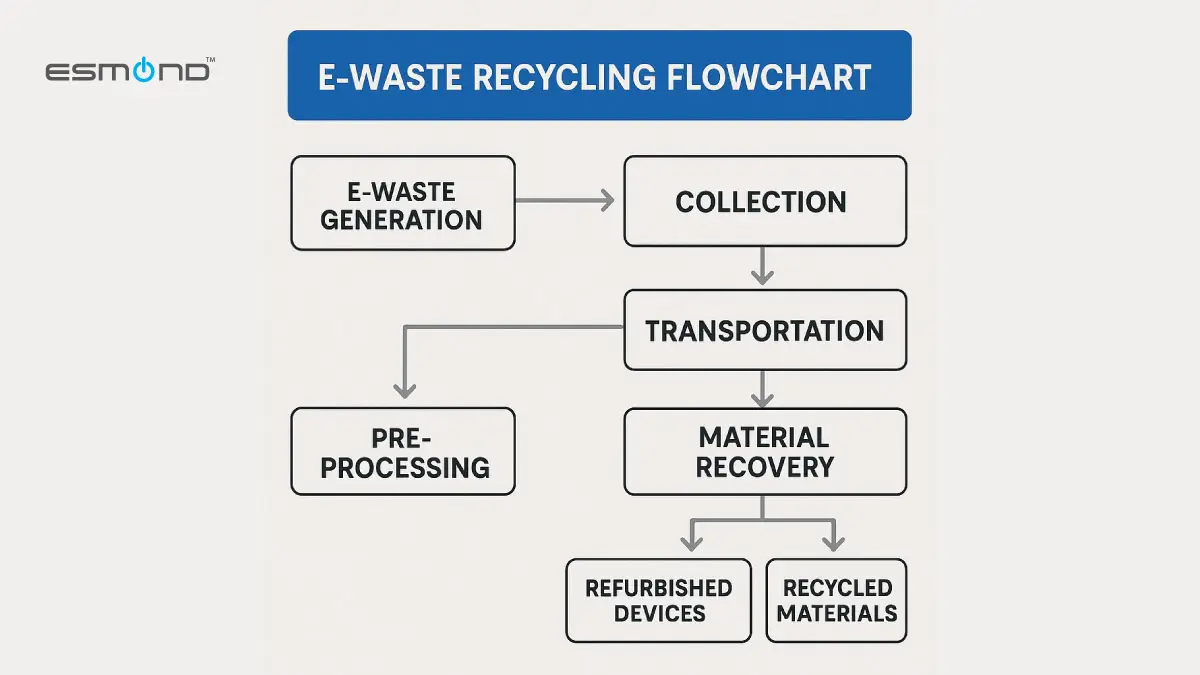
When equipment truly reaches the end of its usable life, proper recycling through certified e-waste programs is essential. Electronic waste contains hazardous materials (such as lead, mercury, and cadmium) that, if disposed of improperly, harm the environment. And most of it is still never recovered: the UN's Global E-waste Monitor 2024 records 62 million tonnes of e-waste generated worldwide in 2022, of which only 22.3% was documented as properly collected and recycled.
Singapore businesses should partner with recyclers committed to environmentally sound practices: look for an NEA-licensed e-waste recycler, and for certification against SS 587, the Singapore Standard for managing end-of-life ICT equipment, whose framework is aligned with ISO 14001. Using a licensed recycler carries a real data benefit too: Singapore's e-waste regulations require a licensed e-waste recycler to ensure that all data stored on a data-bearing device it receives for disposal is permanently erased or destroyed before that device is reused, recycled, or transferred to another recycler, whether inside or outside Singapore. That duty sits on the recycler, not on you — so wipe the drive before it leaves your premises anyway. A reputable recycler carefully dismantles obsolete devices, salvages usable components, and responsibly recycles remaining materials, significantly reducing landfill waste.
Additionally, manufacturers' take-back schemes present practical recycling solutions—many vendors accept old equipment, offering recycling services or trade-in credits. By emphasizing reuse, proper recycling, and responsible disposal, organizations including Jetstar Asia reduce e-waste, reclaim residual value from obsolete equipment, meet corporate social responsibility goals, and contribute positively to environmental sustainability, all while effectively managing operational transitions.
Leveraging Professional Services for Streamlined Asset Retirement – Valuable Lessons from Jetstar Asia
If managing all of the above sounds daunting, don’t worry – you don’t have to do it alone. Leveraging professional tech service providers can greatly simplify the retirement of obsolete devices, especially during complex business transitions like Jetstar Asia’s recent changes. Companies like Esmond Service Centre specialize in end-to-end asset disposition, meaning they can handle everything from evaluating which equipment can be saved, to securely wiping data, to environmentally responsible recycling. Engaging such experts ensures nothing falls through the cracks, a critical factor during significant operational shifts as seen with Jetstar Asia.
| Why Outsource IT Support? | Key Benefits |
|---|---|
| Cost Efficiency | Reduce expenses on internal resources |
| Minimize Downtime | Keep operations running smoothly |
| Reliable Expertise | Leverage specialists like Esmond Service Centre |
| Seamless Transitions | Manage changes effectively (e.g., Jetstar Asia’s 2025 wind-down) |
| Professional Asset Management | Ensures secure, efficient hardware handling |
For example, at Esmond Service Centre we help businesses, including those facing similar transitions as Jetstar Asia, extend the lifespan of devices via upgrades or repairs when viable, and then manage the secure data wiping and disposal when truly retiring them. An experienced provider will have proper tools (for certified data erasure) and comprehensive knowledge of e-waste regulations, ensuring compliance and preventing potential legal issues—crucial considerations during complex restructuring periods similar to Jetstar Asia’s situation.
Professional providers also handle logistics—on-site pickup, packing, and removal of old equipment—with full chain-of-custody tracking for peace of mind, greatly benefiting businesses undergoing transitions like Jetstar Asia. This not only frees up staff time but significantly reduces risk, eliminating concerns about improperly wiped drives or devices ending up misplaced.
Importantly, professional asset retirement services can be highly cost-effective. They might refurbish and resell some obsolete devices (recovering value that offsets service fees) or efficiently consolidate e-waste shipments. Compared to the high costs of data breaches or regulatory fines from improper disposal, engaging these services is economical and prudent—a valuable strategy for businesses experiencing major operational adjustments such as Jetstar Asia.
Plan early to include a professional partner in your tech refresh cycles; a key step in decommissioning planning is engaging reputable e-waste recycling companies right from the start. By working with professionals like Esmond Service Centre, businesses, even those without dedicated IT staff, can safely and affordably refresh their technology infrastructure. Expert guidance on retiring obsolete devices allows your team to concentrate fully on running the business smoothly through transitions.
Key Takeaways for Retiring Obsolete Devices Safely and Responsibly
In today’s fast-paced tech landscape, proactively managing obsolete devices is essential for both security and sustainability—a lesson highlighted by Jetstar Asia’s recent operational changes. First, plan ahead: regularly inventory your hardware and identify aging machines before they become problematic. Back up important data and wipe devices clean using proper tools or certified services so no sensitive information is left behind.
As demonstrated during Jetstar Asia’s restructuring, thorough data sanitization coupled with formal decommissioning steps (like documentation and compliance checks) effectively shields your business from data leaks and audit issues. Next, remember that retiring hardware doesn’t always mean trashing it—repurpose what you can and responsibly recycle the rest.
This approach not only cuts down on e-waste (protecting the environment) but also helps maximize the value from your investments—an approach valuable during operational transitions similar to Jetstar Asia’s. Our guide discussed how selecting reputable recycling partners and considering donations or trade-in programs ensures obsolete devices are handled ethically, aligning with best practices businesses like Jetstar Asia would pursue.
Finally, don’t hesitate to get professional help. Engaging experts (such as Esmond Service Centre’s team) can streamline the entire process—from secure data destruction to logistics—especially critical if your business faces extensive transitions comparable to Jetstar Asia’s situation. By following these practices, you’ll build a robust, eco-friendly IT asset retirement plan that safeguards your data and lets your business upgrade to new technology with confidence.
For More Expert Tech Insights and Support
Enjoyed this comprehensive guide on retiring obsolete devices? Follow our Facebook page, LinkedIn profile or Instagram account for more expert insights and practical tips on cutting-edge technology. We regularly share advice on everything from IT maintenance to sustainable tech solutions. If you’re looking for hands-on assistance, contact Esmond Service Centre today for a professional consultation. Our friendly experts will help you evaluate your obsolete devices, secure your data, and refresh your tech infrastructure with ease – all at an affordable cost. Don’t let old hardware become a headache; reach out to Esmond Service Centre and let us streamline your IT asset retirement process.

Esmond Service Centre's experienced technicians can diagnose and fix it fast — free diagnostics, repairs from $65.