


📑 On this page
An iPad overheating: what is actually happening
Walk-in and WhatsApp customers across Singapore bring us the same worry: the iPad got too hot to hold, or it threw up a warning and went black. In our climate — humid and often above 31°C outdoors — an iPad left on a car dashboard, used for navigation in a cockpit, or filming in the sun heats up fast, and most of those devices are completely healthy. This guide is written from the iPads that cross our bench: how to tell ordinary heat from a fault, the free steps that cool a healthy iPad, and the smaller number of cases where the battery or the board is the real cause.
The 'iPad needs to cool down' message
When the inside of an iPad passes its safe range, iPadOS protects the components by dimming or blacking out the screen and showing a thermometer with the words 'Temperature — iPad needs to cool down before you can use it.' This is a safety cut-out, not a breakdown. Apple lists the steps a device takes to protect itself as it heats up:
- Charging slows or stops, including wireless charging, until the device cools.
- The display dims or goes black to cut the heat the screen itself generates.
- The cellular signal may weaken as the radios wind down, on Wi-Fi + Cellular iPads.
- The camera flash and some camera features are temporarily disabled.
- Overall performance is reduced to let the chip cool down.
Apple's own fix is simple: turn the iPad off, move it out of direct sunlight to a cooler spot, and let it cool before using it again. If the message clears after a few minutes in the shade and does not come back, nothing is broken.
Why iPads overheat: sun, cockpit, charging and apps
Most overheating has an outside cause rather than a fault. Knowing which one you hit tells you whether to worry.
- Direct sun and heat traps: a parked car, a dashboard, a boat deck or a sunlit window can push the surface well past 35°C in minutes.
- A cockpit or car mount: pilots and drivers run an iPad for continuous GPS and moving-map navigation, screen at full brightness, often in direct sun through glass — about the heaviest heat load there is.
- Graphics- or processor-heavy use: 3D games, 4K video recording, exporting video or long video calls work the chip hard and warm the whole device.
- Charging while in use, wireless charging, or a first setup, restore or iPadOS update: Apple notes all of these make a device run warm, and warns that charging a hot device 'can damage it further'.
- A thick or insulating case: especially while charging or gaming, a heavy case traps heat against the back of the iPad.
How to cool an overheating iPad: the free steps
Work through these in order. None can harm the iPad, and together they settle almost every iPad that is simply hot rather than faulty.
- Stop and move to the shade. Get the iPad out of direct sun and out of any hot car or cockpit; a cool, ventilated spot is all most iPads need.
- Turn it off and take the case off. Power down, remove any case or cover, and lay it on a hard, cool surface so heat can escape. Do not put it in a fridge or freezer — sudden cold causes condensation inside.
- Unplug it. Stop charging until it is cool; charging a hot iPad adds heat and, Apple warns, can damage it.
- Close heavy apps and drop the brightness. Quit games, camera, navigation and video apps, lower the screen brightness, and turn on Airplane Mode or Low Power Mode to cut the load while it cools.
- Let it rest, then restart. Give it 10 to 15 minutes out of the heat, then power it on. A restart clears a stuck background process that can keep an iPad warm.
- Update iPadOS once it is cool. A misbehaving app or an old build can cause runaway heat; installing the latest iPadOS and the latest app versions often ends it.
Know the limit before you spend. This will not fix a swollen battery, a failed charging circuit or a shorting logic board — those are hardware, and no setting cools them down. When to stop and bring it in: if the iPad runs hot while idle or off-charge, gets hot within minutes every time, shows a swollen or lifting screen, or keeps showing the cool-down message indoors, stop and seek professional help. Pushing on carries real risk — Apple warns that ambient heat above 35°C can permanently damage battery capacity, and a swollen battery can crack the screen, cause data loss, or in rare cases catch fire. Continuing to charge or use it can turn a simple battery job into a board repair.
Normal warmth vs a real overheating fault
Use this to place your own iPad. Match what you are seeing to whether it is ordinary heat or a sign of a fault.
| What you notice | Likely meaning | Safe to handle yourself? | Typical next step |
|---|---|---|---|
| Warm after gaming, charging, sun or an update | Normal thermal behaviour | Yes — cool it down | None; it recovers |
| Cool-down message that clears in the shade | Safety cut-out working as intended | Yes — move to a cool spot | None; keep it out of heat |
| Hot while idle or while off-charge | Background process, or early battery/board fault | Partly — restart and update | Diagnosis if it repeats |
| Gets very hot within minutes, every time | Battery or charging-circuit fault | No | Battery or board diagnosis |
| Swollen back, lifting screen, or shutdowns | Swollen battery or board fault | No — stop using it | Battery replacement / board repair |
| Will not charge and runs hot when plugged in | Charging IC or battery fault | No | Board-level repair |

When overheating is the battery
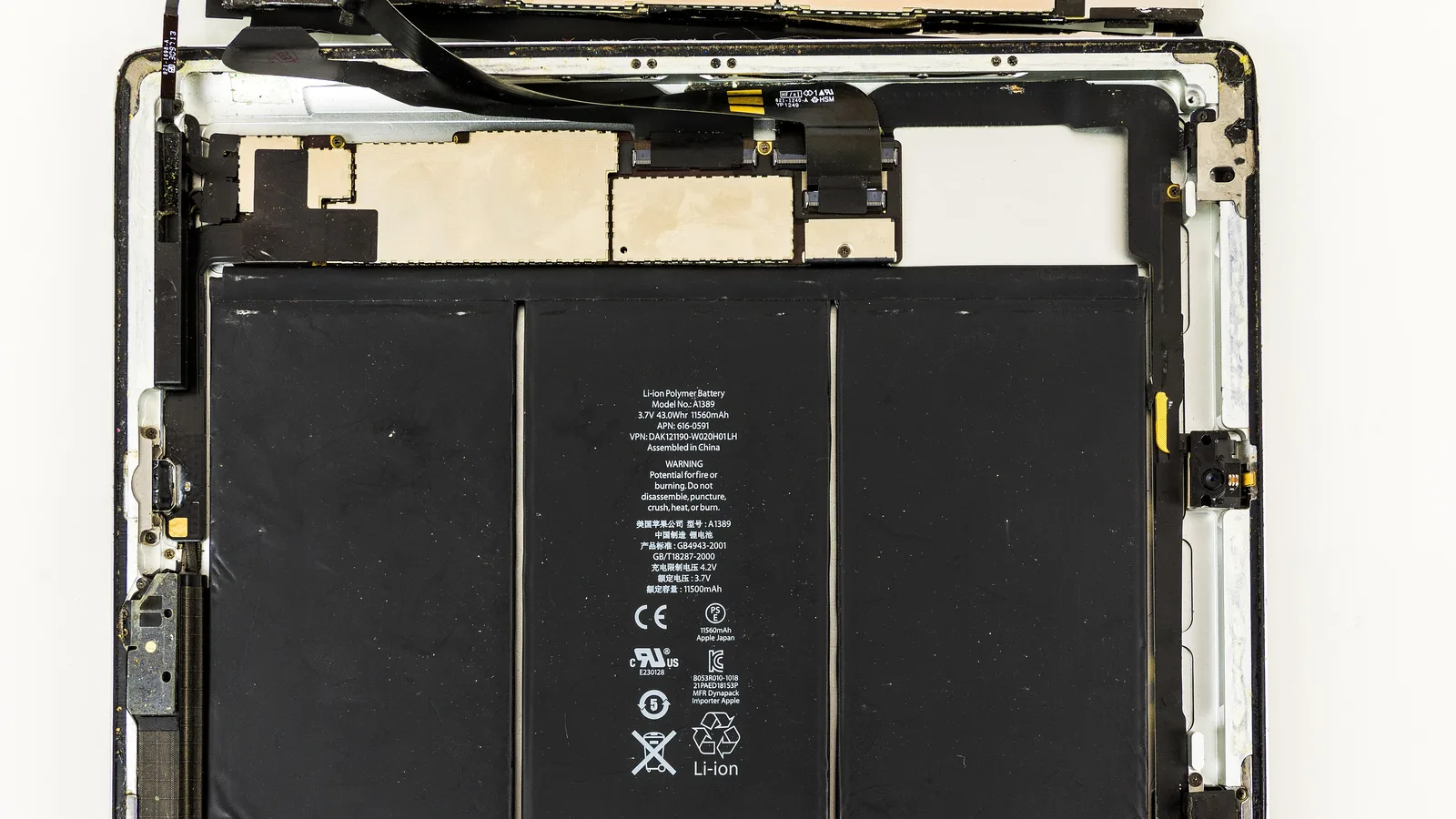
A lithium-ion battery is the most common hardware cause of a hot iPad. As a battery ages or a cell begins to fail, it struggles to hold and deliver charge cleanly, and that lost energy comes out as heat. The flat battery pack inside an iPad sits under the screen; when one begins to fail it can run warm, drain in hours, or swell — and a swelling battery presses up on the screen and digitiser (the touch layer of the screen) from underneath.
- Runs hot while barely in use, or hot to the touch soon after a full charge.
- Battery life collapses — from a full day to a few hours.
- A screen that lifts at one edge, a gap opening along the frame, or a bulge you can feel — signs of a swollen battery; stop using it.
- Random shutdowns even with charge remaining, as the worn cell cannot deliver peak current.

When it is the charging circuit or logic board
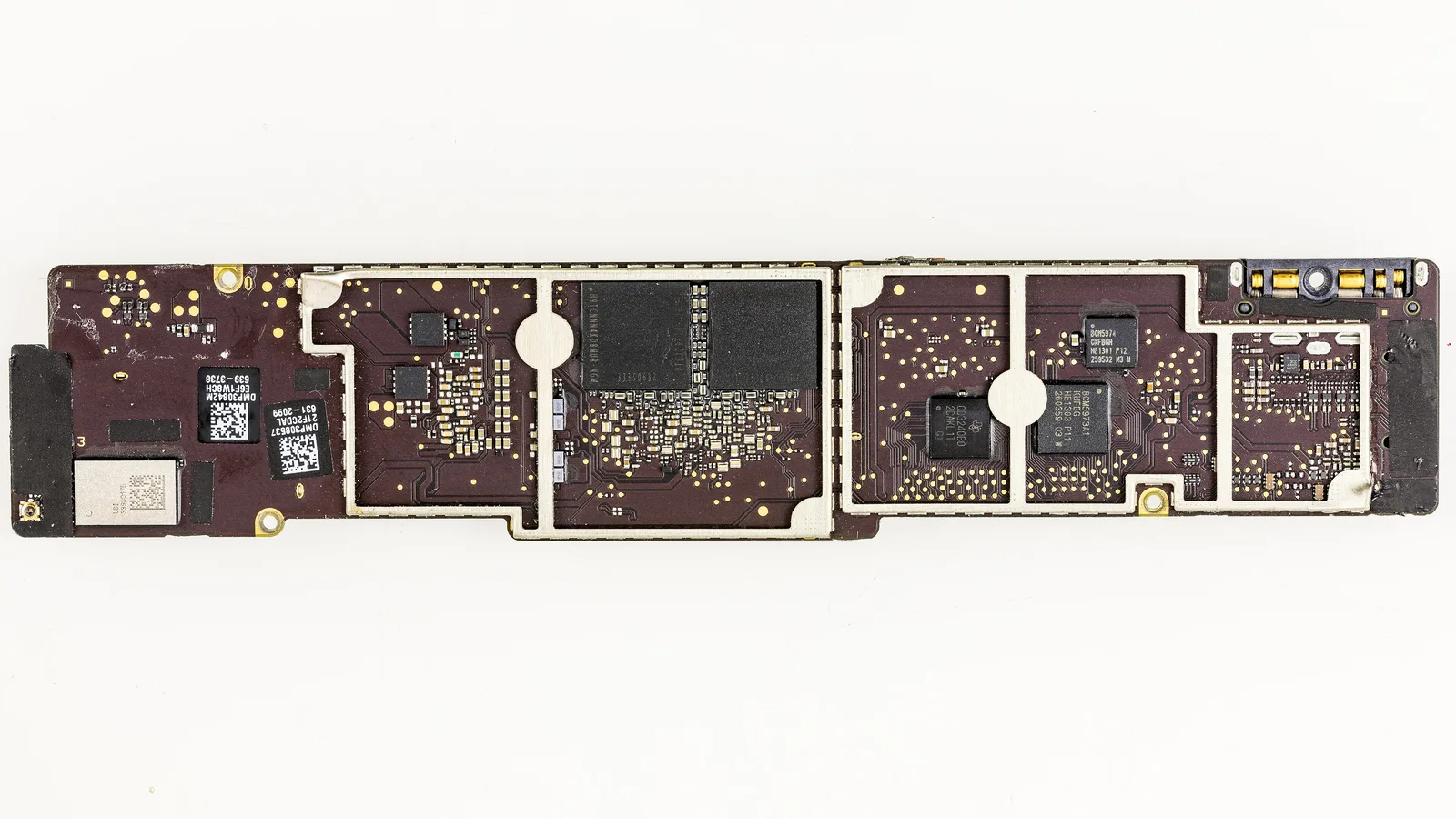
If the battery checks out, the next suspects are the charging circuit and the logic board — the main board inside the iPad. A failing charging IC (a chip on the board), a shorted component or liquid damage can dump heat into the device whether or not you are using it. These faults do not announce themselves with a tidy message; the tell is heat with no outside cause — a cool room, light use or even idle, and the iPad is still hot. This is board-level work, not a part you can swap at home, which is exactly why a measured diagnosis matters before anything is ordered.
What we do in the workshop
When to bring it in: if the free steps do not settle it, or the heat has no outside cause, let a technician take over before a battery job becomes a board repair. When an overheating iPad reaches our bench in Singapore, we do not guess. We read the battery's health and cycle count, measure how much current the board draws at rest and under load, check the charging circuit, and inspect for swelling and liquid damage — before any part is ordered.
- Battery health first: we check capacity, cycle count and whether the cell is swollen, so we never replace a board when a battery is the cause.
- Thermal and power testing: we measure idle and load current to find a component that is drawing too much and heating the board.
- Charging-path and liquid-damage check: we inspect the charge IC, the port and the board for corrosion or a short.
- Honest scoping: we deliberately do not quote a fixed price here — a thermal fault can be a battery or a board, and we would rather diagnose first than guess. Cover may be extendable with the optional Esmond Care plan.
Keeping an iPad cool in Singapore
A few habits prevent most overheating in our climate.
- Keep it out of direct sun, and never leave it in a parked car or on a dashboard.
- For long navigation in a car or cockpit, use a vented mount out of direct sun, drop the brightness, and take the case off.
- Charge on a hard, open surface — not on a bed, sofa or under a pillow — and avoid using it heavily while it charges.
- Install iPadOS and app updates, which often fix a single app that overheats the device.
- Give it a break during long gaming or video sessions, especially outdoors.

Esmond Service Centre's experienced technicians can diagnose and fix it fast — free diagnostics, repairs from $65.