
📑 On this page
Artificial intelligence is redefining gaming, and Razer AI is at the forefront of this transformation. From smarter game development tools to in-game coaching, Razer’s AI initiatives promise to elevate how games are made and played. As tech specialists at Esmond Service Centre with years of experience servicing Razer’s high-performance devices, we’ve witnessed firsthand how cutting-edge innovations can enhance user experiences. In this insight-driven analysis, we delve into Razer’s AI breakthroughs and, more importantly, what they mean for gamers and developers.
You’ll learn how Razer AI tools can streamline game production, help you improve your skills, and ultimately get more out of your gaming experience. Our aim is to provide clear, practical guidance on leveraging these AI advancements – all grounded in expert knowledge and the credibility that comes from working closely with Razer technology.
Razer’s AI Vision: Augmenting Creativity in Gaming
Razer isn’t just a hardware company anymore – it’s embracing AI to augment human creativity in gaming. Razer’s CEO Min-Liang Tan summed up the company’s stance in a post on X: “AI is inevitable. Losing jobs to AI is not.” This underscores the ethos that Razer AI should empower developers and gamers, not replace them. In early 2025, Razer formally unveiled an AI roadmap with two flagship projects: Project AVA, shown at CES 2025 as a gamer’s AI copilot, and the AI QA Copilot, an AI testing assistant. Both have since been renamed – Razer now calls the suite Co-AI, short for Companion AI – so today you will find them as Razer Game Companion-AI and Razer QA Companion-AI. The company also launched a global AI Center of Excellence in Singapore, hiring 150 AI specialists to spearhead next-gen gaming AI. Li-Meng Lee, Razer’s Chief Strategy Officer, put the goal this way: to “empower game developers with the tools that deliver more immersive, intelligent, and efficient gaming experiences at scale.”
Why this matters: Razer’s AI vision is all about enhancing how we create and enjoy games. By integrating AI into its products and services, Razer aims to solve real industry challenges – speeding up development cycles and enriching gameplay. For readers, this means you can expect more innovative features in your favorite games and devices, all powered by Razer AI’s augment-not-replace philosophy. Staying informed about Razer’s AI direction (for example, by following their official Razer AI updates) ensures you won’t miss out on opportunities to benefit from these cutting-edge tools as they roll out.
How Do Razer AI Tools Streamline Game Development?
One of the biggest hurdles in game development is quality assurance – testing and fixing countless bugs before release. Traditionally, QA is slow and labor-intensive, requiring testers to meticulously document each glitch with screenshots and steps to reproduce the error. Enter Razer QA Companion-AI, introduced at GDC 2025 under its original name, the AI QA Copilot. It launched as a cloud plug-in for Unreal, Unity and custom C++ engines; it no longer works that way. Razer’s own documentation now describes a tool that “operates without requiring any SDK, plugin, or game-side instrumentation”, and it reached general availability on AWS Marketplace on 13 November 2025 after a beta with more than 50 studios. Here is how developers actually get it working today:
- Get it through AWS Marketplace, not a beta list: the beta closed. QA Companion-AI is now sold on AWS Marketplace, so procurement and billing run through your existing AWS account, and Razer’s Enterprise plan is listed there. Razer’s own product page offers a demo booking rather than a sign-up form.
- Check the requirements instead of integrating an SDK: Razer’s documentation lists Windows 10 or 11 and a stable connection – it recommends 50 Mb/s upload – because detection and report upload happen in the cloud. There is nothing to add to your build. Advice telling you to integrate the WYVRN SDK describes the 2025 plug-in, and following it now is wasted work.
- Run your playtests exactly as before: Vision AI reads the captured video and screenshots and flags visual glitches, physics and collision problems, UI inconsistencies, missing assets, sequencing errors and other unexpected on-screen behaviour. Separately, you set your own FPS, CPU, GPU and memory thresholds, and a breach is detected automatically.
- Review the AI-drafted ticket – don’t just forward it: each report arrives with a structured description, expected versus actual result, suggested reproduction steps and video of the moments leading up to the issue. Recording length is configurable rather than fixed. A tester still adds context and confirms the finding before it goes anywhere.
- Push it to Jira: Jira integration is built in, including deduplication that spots when the same bug has already been raised – which matters more than it sounds, because a vision model watching every session will find the same broken collider fifty times.
Why it works: Razer’s QA Companion-AI effectively acts as an extra QA team member that never gets tired. By automating the drudge work of documentation, it frees human testers to focus on actual gameplay and edge cases, improving coverage. On the numbers, be careful who is claiming what. Razer’s own blog attributes the widely-quoted figures to Digital Trends reporting internal tests – a 25% increase in bug discovery and a 50% reduction in total QA hours per build. Razer’s Singapore launch release states it more cautiously as cutting QA time “by up to 50%”, and its AWS announcement cites broader industry research at “up to 40%”. These are vendor and press figures on vendor test conditions; nobody outside Razer has published a replication. The direction is well supported, the exact percentage is not something to plan a schedule around. At GDC 2026 Razer went further again, previewing vision-based detection, AI-generated test plans, and gameplay agents that play a test through themselves and return a pass or fail.
Empowering Players with AI: Razer’s In-Game Coach
Have you ever been stuck on a tough level or wanted to get better at a competitive game? Razer’s answer is Razer Game Companion-AI, an AI-powered in-game coach. It was announced at CES 2025 as Project AVA, an “AI gaming copilot” built to offer walkthrough hints, strategy tips, and even PC optimization advice as you play. The name has since moved, and this catches people out. Project AVA is no longer the in-game coach: at CES 2026 Razer relaunched AVA as an AI desk companion – a 5.5-inch animated hologram with eye-tracking and a PC Vision Mode that reads your screen – while the in-game coach carries on as Game Companion-AI. Razer’s developer documentation still lists it as “Coming soon”, so what follows is what Razer says it will do, not something you can install this afternoon. Here is how gamers can make the most of it when it arrives:
- Summon it without leaving the game: Razer describes an assistant that sits over the game client rather than a separate app, so you can call on it mid-match instead of alt-tabbing to a wiki. That is the whole design premise – help that does not break the session.
- Get real-time coaching: Razer says the tool uses vision analysis together with other data inputs, such as public APIs, to produce personalised recommendations as you play – opponent analysis, guided gameplay and on-the-fly walkthroughs for unlocking gear or finding hidden quests.
- Ask when you’re stuck: instead of pausing to search for a walkthrough, the coach is meant to answer in the moment. Treat that as convenience rather than accuracy: an assistant reading your screen is guessing at intent, and it will sometimes guess wrong.
- Read the post-match debrief: Razer promises expert post-match insights – what went well, where you struggled, and what to practise. This is the part most likely to actually raise your rank, because it is the part you can act on between matches rather than during one.
- Let it tune the machine, within limits: Razer also pitches one-click setup optimisation – troubleshooting in real time, minimising lag, keeping drivers current. Useful, and the boundary of what software can do: it changes settings, not silicon.
Why it works: Razer’s in-game coach aims to make learning new games or mastering competitive play easier and more engaging. Unlike generic tutorial videos, it gives personalized, context-aware advice – essentially distilling expert knowledge into timely suggestions just for you. Whether players want it is a separate question, and the honest answer is mixed. In a YouGov survey of 397 US adult gamers conducted online in August 2024, the AI uses gamers backed most strongly were better NPC behaviour – 46% among heavy gamers – and cheat detection at 41%. Personalised tips and customised experiences sat much lower: 19% among moderate gamers and 26% among infrequent ones. So an in-game coach is not a feature players have been demanding; it will be judged on whether it demonstrably makes them better, and that evidence does not exist yet.
Razer’s Global AI Push: What It Means for You
Razer isn’t treating AI as a short-term experiment – it’s investing in AI for the long haul, and that commitment has direct implications for gamers and developers. On 4 August 2025, Razer opened its first AI Center of Excellence in Singapore, the first of three planned global hubs, backed by Digital Industry Singapore and with 150 AI roles to be hired locally. The second has since opened in France. As of August 2026 Razer says it operates AI Centers of Excellence in Singapore and France with close to 100 researchers, data scientists and engineers between them; a United States hub is still to come. Europe’s remit is WYVRN, Razer’s developer platform covering AI game tools, Sensa HD Haptics, Chroma RGB and THX Spatial audio through a single SDK. Razer’s longer-term AI investment has been reported at over US$600 million. A year on, this is what has actually come out of it: QA Companion-AI reached general availability on AWS Marketplace in November 2025; Project AVA returned at CES 2026 as a desk companion, with a fully refundable US$20 reservation deposit taken in the United States; GDC 2026 brought vision-based bug detection, AI-generated test planning and autonomous AI gameplay agents; and on 4 August 2026 – a year to the day after the Singapore centre opened – Razer and the National University of Singapore’s School of Computing announced the Razer-NUS Joint AI Research Lab, hosted on the NUS campus and directed by Associate Professor Ooi Wei Tsang. It introduces a research domain Razer calls GANI – Gaming Artificial Narrow Intelligence – meaning AI models purpose-built for interactive environments, such as a teammate that adapts its tactics to your skill in the middle of a match. Here’s how you can ride this wave and stay ahead:
- Follow the right account: Razer publishes AI rollout dates, events and beta sign-ups through @RazerAI on X, and announces at CES and GDC. Given how fast the naming has changed – QA Copilot to QA Co-AI to QA Companion-AI in under a year – the official feed is worth more than a search result written last season.
- Get hands-on where it is actually available: the developer tools are the shipping half. QA Companion-AI can be bought on AWS Marketplace or demoed directly; Game Companion-AI is still listed as coming soon, so a beta programme is the only route in. Don’t plan a pipeline around a tool that has not shipped.
- Leverage the Razer ecosystem: Razer’s advantage is that AI runs across hardware and software, so gameplay optimisations tie into Cortex and Synapse settings. Keep your Razer software current – but remember that a settings change is a software fix, and it can only ever solve a software problem.
- Get expert help for the hardware half: when the problem is the machine rather than the settings, an AI assistant is the wrong tool. Esmond Service Centre repairs Razer laptops in Singapore – thermal servicing, battery, screen, keyboard and board-level work – and will tell you which of the two you are looking at before you spend anything.
- Keep learning: the tools that matter in a year will not be the ones named today. Developers should get comfortable reading AI-drafted bug tickets critically; players should treat AI coaching as a second opinion rather than an instruction.
Why it matters: Razer’s global push in AI is a strong signal that AI features will soon become standard in gaming hardware and software. For gamers, this promises ever more immersive and personalized experiences – imagine games that adjust their difficulty on the fly or peripherals that auto-tune performance based on AI insights. For developers, it means access to advanced tools that can cut costs and development time, allowing more focus on creativity. By staying proactive – informed, involved, and educated – you ensure that you’re not left behind as these AI-driven changes take hold. Razer’s investment (like the 150 engineers hired for the Singapore AI hub) shows that the company is serious about leading this charge. In practical terms, expect a steady stream of innovations from Razer AI; being ready to adopt them means you’ll enjoy better games and build better games, marking a win-win for the entire community.
What Razer AI Cannot Fix – and When to Stop and Bring It In
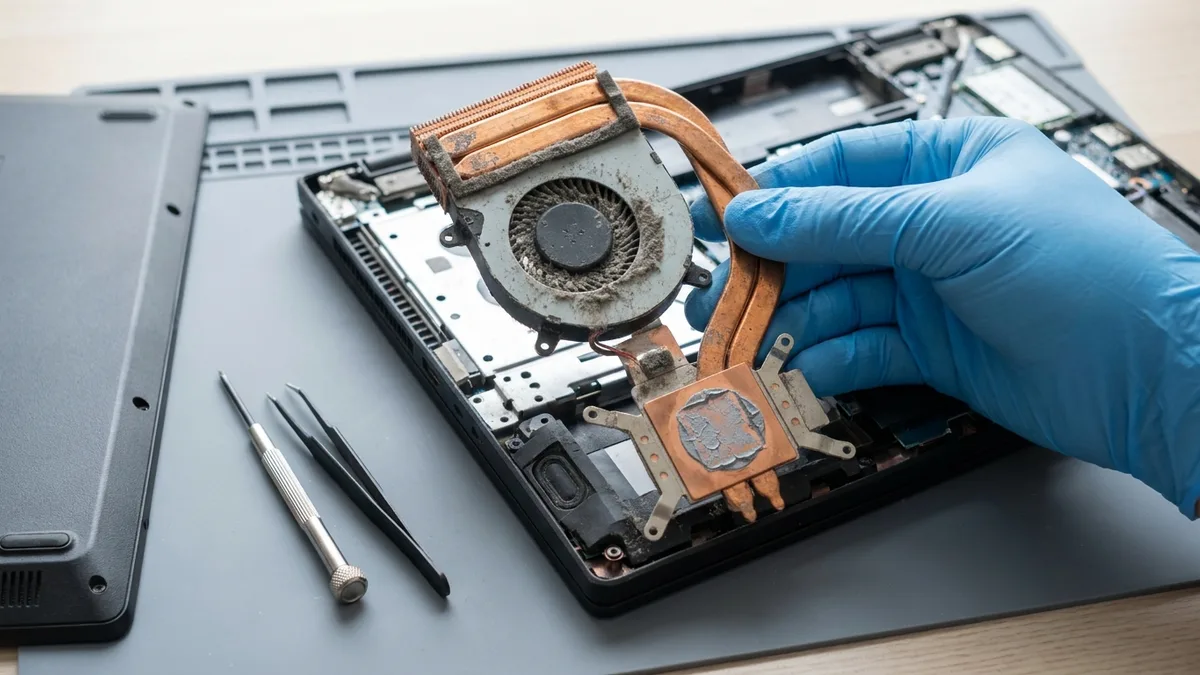
Everything above is software, and it is worth being precise about where software stops. Game Companion-AI coaches how you play and can change settings; it cannot change what your hardware is able to deliver. QA Companion-AI finds and documents bugs; it does not fix them, and Razer’s own documentation is clear that a tester still adds context and submits the report. Neither product touches a fault in the machine itself. A frame rate that collapses because a heatsink is packed with dust cannot be repaired by a driver update, an optimisation preset or an AI assistant, and a swollen battery cannot be fixed at all – it can only be replaced.
This is the point to stop tuning and bring the laptop in. On the bench, these are the signs that the problem is physical rather than a setting:
- Your frame rate is fine for the first few minutes and then falls away, and the chassis is hot and the fans are loud – that is thermal throttling, not a graphics preset.
- The laptop shuts down or restarts by itself mid-game, or under any sustained load.
- The trackpad or keyboard has started to sit proud, the base plate has a gap, or the laptop rocks on a flat desk – these are the signs of a swelling battery.
- Fan noise has changed – grinding, rattling, or a fan that has gone silent while the machine is still hot.
- The screen shows lines, flicker or dead pixels, or the charging port has become loose.
The honest cost of getting it wrong: continuing to game on a machine that is already overheating is how a thermal problem becomes a board problem, and a board repair is in a different price class from a clean and re-paste. On a swollen battery the risk is not just damage – the pouch is under pressure and the gas inside it is flammable, which is why our own Razer battery guide says plainly: do not open the laptop to check. Esmond Service Centre publishes its starting prices rather than quoting on arrival – Razer repairs start from S$186 for a Blade or Stealth battery, S$238 for a keyboard and S$258 for a screen, with most common jobs completed the same day and a 90-day repair warranty. Motherboard, charging-port and water-damage work is quoted upfront, before anything is started. If you are not sure which side of the line you are on, bring it in for a free diagnostic and we will tell you.
Razer AI is Shaping the Future of Gaming – Key Takeaways
Razer’s foray into artificial intelligence is much more than a buzzword – it’s a comprehensive strategy to improve both game creation and gameplay. We’ve seen how tools like Razer QA Companion-AI can drastically streamline development by detecting bugs and generating reports automatically, freeing human talent for more creative work. At the same time, AI-driven features such as Game Companion-AI are positioned as personal coaches, delivering real-time tips and post-match analysis to help players elevate their skills – though that half is still listed as coming soon. The key takeaway is that Razer is leveraging AI to augment human ability: developers can build higher-quality games faster, and gamers can enjoy a tailored, skill-building experience.
Crucially, Razer’s approach emphasizes AI as an empowering tool rather than a replacement for people – a philosophy highlighted by leadership and evident in its products improving jobs and gameplay, not eliminating them. With Razer investing in AI hubs and R&D globally, we can anticipate continuous advancements rolling out into our devices, games, and workflows. For readers, the value is clear: those who embrace these Razer AI innovations early will gain a competitive edge, whether it’s a studio releasing more polished games or a player climbing the ranks with smart assistance.
We hope this comprehensive guide has shed light on the practical benefits of Razer AI. By staying informed and open to these technologies, you’ll be well-positioned to thrive in the future of gaming. If you found these insights useful, consider sharing the article with fellow gamers or developers who’d appreciate a peek into the future that’s unfolding now.
Ready to Embrace Razer AI? Connect with Us for Expert Support
Enjoyed this comprehensive Razer AI guide? Follow our Facebook page, LinkedIn profile or Instagram account for more expert insights and practical tips on cutting-edge technology. We regularly share updates on the latest in gaming innovations, including Razer’s AI breakthroughs, so you can stay ahead of the curve.

Esmond Service Centre's experienced technicians can diagnose and fix it fast — free diagnostics, repairs from $65.