
Repair Services

Dell Laptop Keyboard Replacement in Singapore

Last updated:

Facing keyboard issues with your Dell laptop? Esmond Service Centre provides professional Dell laptop keyboard replacement in Singapore, catering to Inspiron, XPS, Latitude, Vostro, and Alienware models. Our experienced technicians offer fast repairs, brand-compatible parts, and trusted service for optimal performance at work, school, or gaming.

4.92,705+ reviews
16+ yrsexperience
Freediagnostics
2service centres
Dell Laptop Keyboard Replacement Singapore by an Esmond Service Centre specialist

How Much Does Dell Laptop Keyboard Replacement Cost in Singapore?

Dell laptop keyboard replacement at Esmond Service Centre starts from S$186 for Inspiron, XPS, Latitude and Vostro models, and from S$238 for Alienware gaming series. Most replacements take 2-3 hours, enabling same-day service, and include a 90-day warranty extendable to 1 year with the Esmond Care Plan. If the laptop in front of you is not a Dell, start at our laptop keyboard repair Singapore page instead.

ModelEstimated Repair TimeStarting Price (SGD)
Dell Inspiron, XPS, Latitude, Vostro2 – 3 HoursFr $186
Dell Alienware Gaming Series2 – 3 HoursFr $238

Prices are before GST (9% is added at payment).

WhatsApp us your Dell service tag number for real-time parts availability and an exact quotation.

Dell Laptop Models Supported for Keyboard Replacement

We handle comprehensive Dell laptop keyboard replacement across popular models and series, including:

SeriesPopular Models Supported
InspironInspiron 14, 15, 16, 5000 Series
XPSXPS 13, XPS 15, XPS 17
LatitudeLatitude 5410, 5420, 7420, 9430
VostroVostro 14, 15 Series
Alienwarem15, m16, m17, x14, x15, x16, x17 R1/R2

🔍 Unsure of your Dell model? Simply WhatsApp your Service Tag, and we’ll verify compatibility instantly.

Not sure of your Dell model number? See our quick guide: how to find your Dell model number →
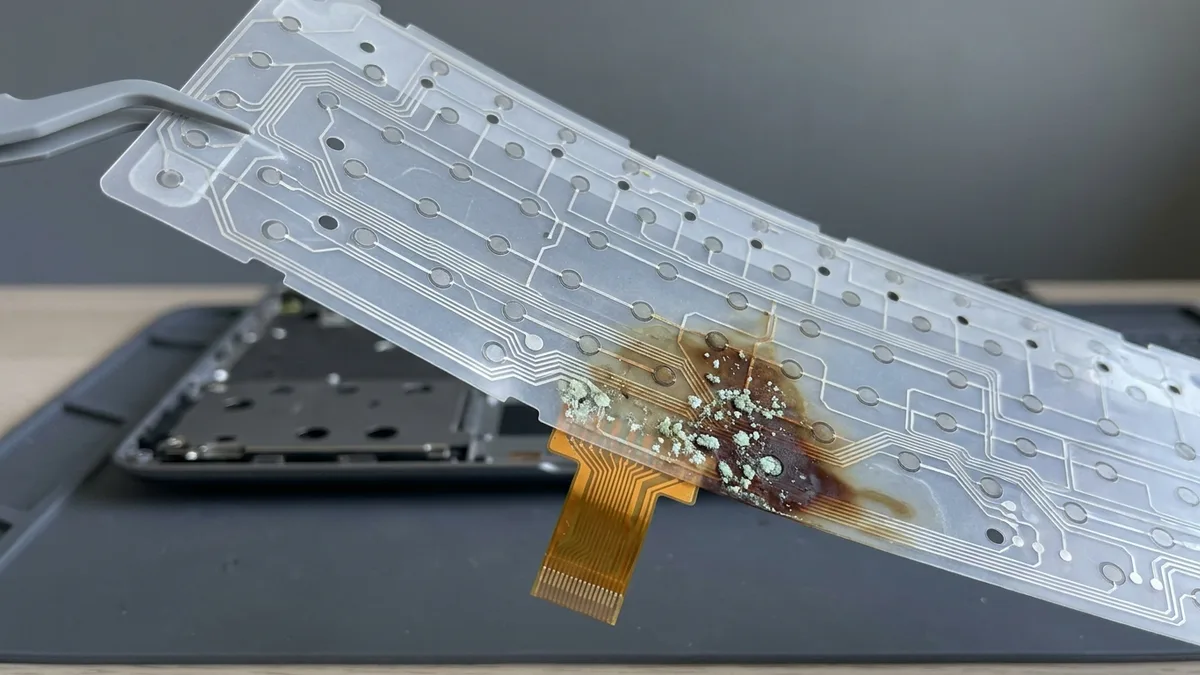
A translucent laptop keyboard membrane held up by a thin tool, its printed traces and contact pads visible, with a brown stain and pale green crystalline corrosion spreading across one area and the orange ribbon tail hanging loose over the opened laptop base below

Common Signs Your Dell Laptop Keyboard Needs Replacement

If you notice any of these issues, it's likely time for Dell laptop keyboard replacement:

🚨 Prompt replacement prevents further damage and restores typing accuracy and gaming performance — but not every one of these signs means a whole keyboard. If it is a single sticky or stuck key, read our own guide first: what to do when a laptop keyboard stops working. It explains why prising a keycap off at home usually makes it worse, and we will tell you which of the two you need before you pay for anything.

If the keys stopped working after a spill, do this before anything else. Hold the power button down until the laptop shuts off, unplug the charger, and stand it upside down so what went in can drain back out — and do not switch it on to test it, because powering a wet board is what turns a spill into a short. A new keyboard on its own is often not the repair: liquid that reaches the keys usually reaches the board underneath them, and the residue keeps corroding after the machine looks dry. Our own guide explains why that happens — why water damage needs chemical cleaning — and the clean is a separate job at a lower price, laptop water damage repair from S$68. Bring it in and we will tell you which of the two you need, and it is sometimes both.

What’s Included in Our Dell Laptop Keyboard Replacement Service?

Our comprehensive Dell laptop keyboard replacement service goes beyond simple parts swapping:

✅ Full diagnostic checks of keyboard, trackpad, and associated hardware
✅ Static-free, professional disassembly to avoid internal damage
✅ Installation of high-grade OEM-equivalent Dell replacement keyboards
✅ Thorough testing for typing accuracy, responsiveness, and backlighting
✅ Cleaning internal cooling fans and dust removal
✅ BIOS and firmware verification to ensure seamless hardware integration
✅ 90-day warranty on workmanship, extendable via Esmond Care Plan

We restore your Dell or Alienware laptop to peak keyboard performance.

Tips to Extend Your Dell Laptop Keyboard’s Lifespan After Replacement

To maintain your Dell keyboard after replacement, follow these best practices:

📘 Our technicians provide personalised after-care guidance for lasting keyboard durability.

Why Choose Esmond Service Centre for Dell Laptop Keyboard Replacement?

Esmond Service Centre is Singapore’s trusted choice for Dell and Alienware keyboard repairs, backed by 16 years of industry experience, and we would rather show you why than tell you:

✅ Extensive experience with Dell consumer, business, and gaming laptops
✅ Skilled technicians trained in advanced RGB gaming keyboards and firmware management
✅ Clear, upfront pricing with no hidden charges
✅ Convenient walk-in or appointment-based service availability
✅ Trusted reputation with hundreds of genuine 5-star customer reviews

Choose Esmond Service Centre for dependable and professional Dell laptop keyboard replacements.

How to Book Your Dell Laptop Keyboard Replacement?

Booking your Dell laptop keyboard replacement is quick and straightforward:

  1. WhatsApp your Dell laptop model (e.g., XPS 13 9310, Alienware x17 R2)
  2. Or send us your Dell Service Tag number (located under your laptop or within BIOS settings)
  3. Receive immediate confirmation on parts availability, exact pricing, and booking slots

✅ Same-day keyboard replacements available—walk-in or schedule your preferred appointment today.

Restore your Dell laptop’s keyboard swiftly with Esmond Service Centre—Singapore’s trusted repair experts!

Tell us what's wrong — free diagnosis, no obligation

Send us the symptom and we'll come back with what it likely is, what it will cost, and how long it will take. The diagnosis is free, and if we can't fix it, you pay nothing.

How can we contact you?
4.9★★★★★EXCELLENTbased on 2,705+ Google reviews across 2 branches
★★★★★
Had a battery alert warning this morning on my HP Spectre laptop. Ran a battery test and the capacity is only left with 23% despite component test shows Passed. HP support ask me to calibrate the battery which is a very lengthy and tedious procedure and it does not solve the original battery issue of degraded capacity. HP Support also need time (the whole day also never get back to me) to check for stocks and price. I just need a faster clean fix to this issue i.e. simply replace the battery. Searched the Internet and found Esmond Service Centre with good reviews. Fast response and helpful advice. They transferred the battery to the branch at MidView in 2 hours and changed my battery within 30 to 40mins when I was on-site. Price was competitive compared to other quotes I got and also purchased the extended warranty for 1 year for $48. They also provided after sales customer service when I asked about my chargers. Not like some shops who will ignore you after the purchase. Great service and will look for them in future if I need to repair my laptop.Read full reviewShow less
KK JacelynSin Ming · 3 months ago
★★★★★
Highly experienced, customer focus, general great at what they're doing which servicing and repairing computer. I went there to change battery for my lap top and was highly impressed by their good technical, reasonal pricing, ease of doing business and friendliness of front desk staffs. They found something else ; ie the cooling system that required attentive alertedmet the issue via WA prompting recommending solutions and cosing. It was easy to make decision with transparent transaction. Job was done very quickly originally supposed to take 30 mins with the addition task it took another 20 mins which iscceptable a we were able to waiting relaxing while having a coffee in the multitude of F&B outlets in this mall. My laptop was very well serviced and repair and within my original estimated budget. Super happy with Esmond for their great capability and professionalism. victor who attended to us was a bit quiet but nonetheless was able to communicate important info clearly to me. Keep it up EsmondRead full reviewShow less
SSam Goh SEAlexandra · 10 months ago
★★★★★
I am extremely thankful for the outstanding service I received from Jay. I called ahead to ask whether I would need to wait to get my laptop repaired, as it had completely stopped turning on and it was an urgent situation for me. I was told to simply walk in, and to my surprise, the issue was diagnosed and fixed in less than 30 minutes. What impressed me most was that the repair was done right in front of me, and Jay remained professional, friendly, and transparent throughout the entire process. To top it all off, he explained that it was only a quick fix and chose not to charge me anything. I truly couldn’t be more grateful for the help and exceptional customer service. Thank you, Jay, for turning a stressful situation into such a positive experience. Highly recommended! Also noticed that they sell other small gadgets which can make good last min gifts too!Read full reviewShow less
JJollene YangAlexandra · 2 months ago
★★★★★
Sent my iMac in for a screen replacement and had a very positive experience with Esmond Service Centre. Customer service was responsive and patient throughout the process, and they kept me updated clearly. Repair was completed quickly and the iMac is working well again. They also showed me photos of the internal dust buildup and explained the recommended servicing transparently, which I appreciated as someone not familiar with repairs. Overall, a smooth and reassuring experience. Thank you for the professional service!Read full reviewShow less
WWendy AngSin Ming · 3 months ago
★★★★★
I messaged Esmond Service Centre to get my MSI screen fixed and was impressed right from the start. They replied quickly, and I was able to head down on the same day itself. I could simply walk in and wait at the store, and the technician took the time to look at my device and give solid, practical advice. They also stuck exactly to the estimated timing of 1–2 hours, which made the whole experience smooth and hassle-free. Everything was handled efficiently and without any fuss. Excellent job and great service overall.Read full reviewShow less
NNiveethaSin Ming · 4 months ago
★★★★★
5/5 experience and service Appreciate the prompt responses! It was easy to book an appointment / timeslot because they are very approachable. It's an introvert-friendly experience. I like how direct and straightforward the process and advices/quotations were. I'm a big fan of that. Was also my first time finding a service to replace my laptop battery, and I'm so glad to have found them. Will definitely come back again for further assistance. 😄Read full reviewShow less
Ffatin nur aqilahAlexandra · 6 months ago

Frequently Asked Questions

How much does Dell laptop keyboard replacement cost in Singapore? +
Dell laptop keyboard replacement pricing starts from S$186 for Inspiron, XPS, Latitude, and Vostro models, and from S$238 for Alienware gaming models.
How long does a Dell laptop keyboard replacement typically take? +
At Esmond Service Centre, Dell keyboard replacements usually take 2–3 hours, enabling convenient same-day repairs.
Is warranty provided on Dell laptop keyboard replacements? +
Yes, we offer a 90-day warranty on all keyboard replacements, extendable to 1 year with our optional Esmond Care Plan.
Can you repair keyboards on Dell Alienware gaming laptops? +
Absolutely—we specialise in Alienware gaming keyboard replacements, including precise RGB lighting calibration and firmware integration.
Which Dell models do you replace keyboards for? +
We cover Inspiron 14, 15, 16 and 5000 Series; XPS 13, 15, 17; Latitude 5410, 5420, 7420, 9430; Vostro 14 and 15; and Alienware m15, m16, m17, x14, x15, x16, x17 R1/R2. Unsure of your model? WhatsApp your Service Tag and we'll verify compatibility instantly.
Do you use genuine Dell keyboards? +
No — as an independent centre we fit high-grade OEM-equivalent, Dell-compatible keyboards, fitted with static-free professional disassembly and tested for typing accuracy, responsiveness, and backlighting before return.
Is the diagnostic really free, and can I get a quote before committing? +
Our quote is free and unconditional. Just WhatsApp your Dell Service Tag number for real-time parts availability and an exact quotation before any work begins.
What's included beyond swapping the keyboard? +
Our service goes beyond a simple parts swap: full diagnostics of the keyboard, trackpad, and associated hardware, internal cooling-fan cleaning and dust removal, BIOS and firmware verification, plus a 90-day workmanship warranty extendable via Esmond Care Plan.
Where can I get my Dell keyboard replaced near me? +
Esmond Service Centre has two branches in Singapore (Alexandra and Sin Ming) and is rated 4.9 stars. Same-day keyboard replacements are available—walk in or schedule an appointment, and WhatsApp your Dell model or Service Tag for confirmation.
My Dell keyboard stopped working after a spill — do I just need a new keyboard? +
Not always, and the order matters. Hold the power button until the laptop shuts off, unplug the charger and stand it upside down to drain, and do not switch it on to test it. Liquid that reaches the keys usually reaches the board underneath, and the residue keeps corroding after the machine looks dry, so a new keyboard fitted over an uncleaned board can fail again. Bring it in: we check both and tell you whether you need the chemical clean, the keyboard, or both.

Need expert help with your device?

Bring it to Esmond Service Centre at Sin Ming or Alexandra — free diagnostics, repairs from $65, many done in 1–2 hours.

WhatsApp us