

📑 On this page
A cracked or dead laptop screen feels like the end of the machine — but in most cases it isn't. The glass you look at is only one layer of the display, and on the vast majority of Windows laptops that layer can be swapped on its own, often for a fraction of what a new laptop costs. The honest question is not can it be repaired, but should it be — and that depends on what actually broke, how old the laptop is, and what a new panel costs against the value of the machine. This guide walks through how we answer that question on our bench every day.
The short answer
For most laptops three to four years old or newer, repairing a broken LCD is the sensible choice: a replacement panel is a standard, widely available part, the job takes us about 1–2 hours, and you keep the machine, the data and the setup you already know. Replacing the whole laptop makes more sense when the panel is unusually expensive (a high-resolution OLED or a bonded touchscreen), when the laptop already has other failing parts, or when it is old enough that you would replace it within a year anyway.

What actually broke: glass, LCD panel, or the whole assembly
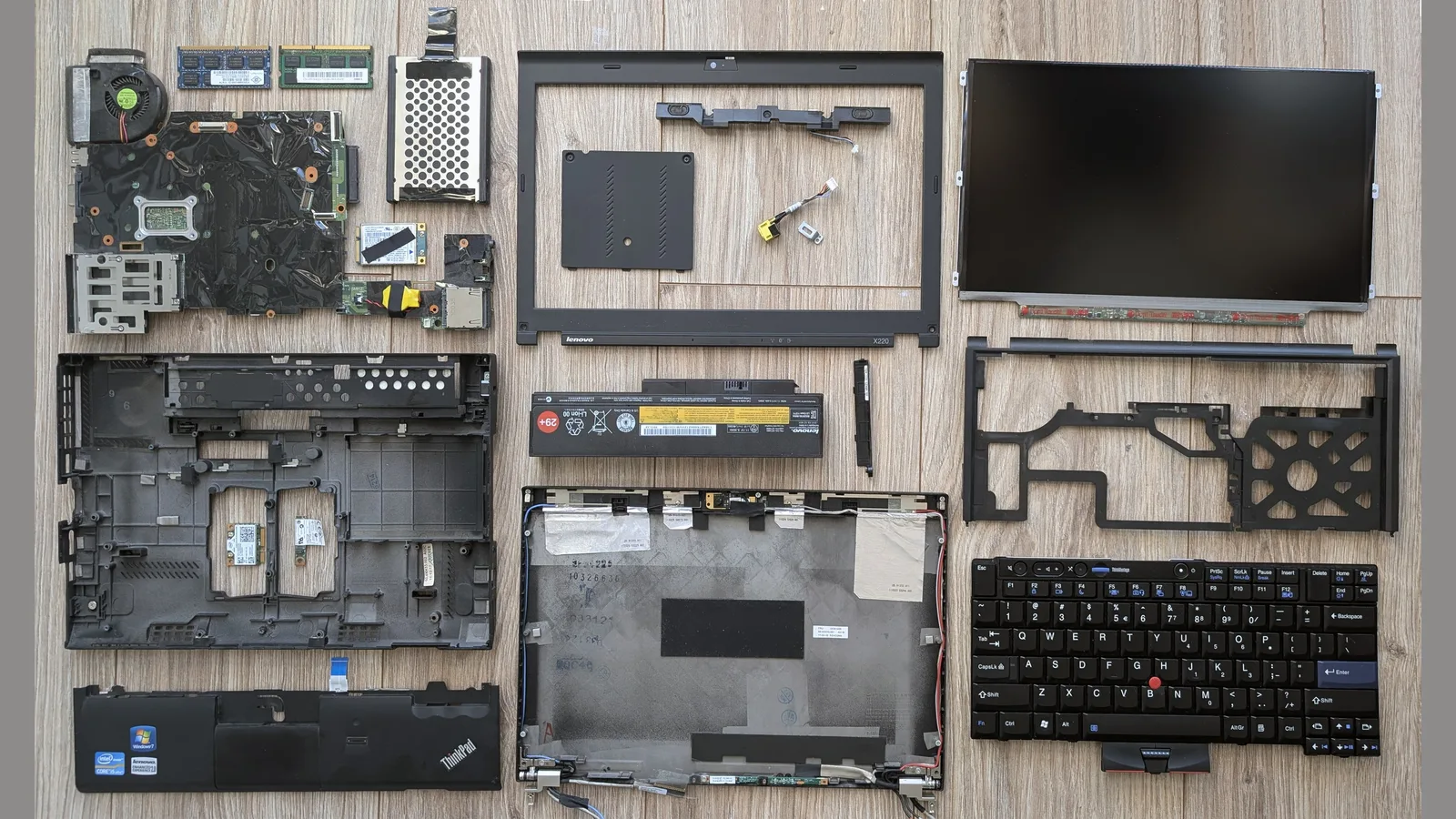
A laptop display is not a single sheet of glass. From front to back it is: a protective glass or plastic layer (with a digitiser — the touch layer of the screen — on touch models), the LCD or OLED panel that actually produces the image, an LED backlight behind it, a thin video (eDP) ribbon cable, and the lid — the plastic or metal display assembly that houses all of it along with the hinges, webcam and antennas.
- Protective glass or plastic layer (with a touch layer on touch models)
- The LCD or OLED panel — the part that produces the image
- The LED backlight behind the panel that supplies brightness
- The eDP video cable that connects the screen to the motherboard
- The display assembly (lid) — casing, hinges, webcam and antennas
Repair people draw a useful line here. A pure glass crack, where the picture underneath is still sharp and colours are normal, is cosmetic. But once you see distorted colours, spreading black blotches, bright or dark lines, or flickering brightness, the LCD panel itself is damaged and the panel has to be replaced. On most laptops the glass and the panel are one bonded unit, so a cracked screen almost always means a new panel — not just new glass.

First, diagnose it: is it really the LCD?
Before spending a cent, prove where the fault is. A panel swap is wasted money if the real problem is a loose cable or the graphics chip. These are the same checks we run on the bench, and you can do them at home. If you are not comfortable opening the laptop yourself, stop and bring it in to a professional rather than risk cracking the panel further. For a deeper look at each fault, see our guide to types of laptop LCD screen problems.
- External-monitor test: plug into an HDMI monitor. If the external picture is clean, the graphics chip is fine and the fault is the panel, cable or backlight — all repairable. If the external picture is also broken, the problem is the motherboard or GPU, which a new screen will not fix.
- Hinge-flex test: if lines or flicker change as you gently open, close or twist the lid, the video cable is loose or damaged — often the cheapest fix of all.
- Flashlight test: if the screen is black but you can see a faint image with a torch held close, the backlight (not the whole panel) has failed.
- Crack and pressure check: a visible crack, spiderweb pattern, or a spreading dark 'ink' blotch is physical panel damage — it will not heal and needs a new panel.
Repair or replace? A simple decision framework
Once you know it is the screen, weigh four things: the cost of the panel against the value of the laptop, the age of the machine, whether anything else is failing, and how the panel is built.
- The 50% rule: if a screen repair costs more than about half the price of an equivalent new laptop, replacement starts to make sense.
- Age: a laptop three to four years old or newer is usually worth repairing; a much older machine you may replace within a year anyway.
- Other faults: a failing battery, dying keyboard or swelling case alongside the screen tips the balance toward a new machine.
- Panel type: a standard FHD panel is inexpensive; a 4K OLED or a bonded touchscreen is far dearer and narrows the gap to a new laptop.
How we replace a laptop LCD at Esmond
When a laptop comes in with a broken screen, this is the step-by-step process on our bench.
- First, we confirm the fault with the external-monitor and cable checks above, so we replace only what is actually broken.
- Then, we identify the exact panel by its model and part number — resolution, finish (matte or glossy), thickness, connector position and whether it is touch — because the wrong panel will not fit or will not display.
- Next, we power down the laptop and isolate the battery before opening anything.
- After that, we release the bezel (or, on bonded lids, the whole panel) with plastic spudgers to avoid cracking the surround.
- We then remove the panel's screws or adhesive, fold it forward, and disconnect the eDP video ribbon — peeling back the securing tape gently so the connector is not torn.
- Finally, we seat the new panel, reconnect the cable, and test at full brightness for dead pixels, uniformity and touch before closing up.
Most screen replacements are done in about 1–2 hours, and prices typically start from S$186 (before 9% GST). Every repair carries a 90-day warranty on parts and labour, which you can extend up to one year with the optional Esmond Care plan. We replace screens for MacBook, HP, Dell, Lenovo, ASUS, Acer, MSI, Razer, Samsung, Microsoft Surface and more, at our Alexandra and Sin Ming branches. See our laptop screen replacement service for details.
When replacing the laptop makes more sense
If any of these apply, replacing the machine may be the wiser move:
- The panel is a costly bonded OLED or Retina/touch unit and the laptop is already old.
- The screen is one of several problems (battery, hinges, keyboard, storage).
- The laptop is old enough that you would upgrade within a year regardless.
- Repeated impact damage suggests the machine cannot survive your use — a sturdier model may cost less over time.
If any of these apply, we'll tell you straight — we would rather advise a new machine than sell you a repair that does not make sense.

Esmond Service Centre's experienced technicians can diagnose and fix it fast — free diagnostics, repairs from $65.