
📑 On this page
Laptop screen issues – from small flickers to full-on cracks – can bring your productivity to a grinding halt. These problems disrupt work, school, and entertainment alike. Timely laptop screen repair is crucial not only for restoring your device’s usability but also for preventing minor issues from escalating. In this guide, we’ll explore everything you need to know about fixing your laptop’s display, especially if you’re in Singapore where having a reliable service is a must. We draw on the expertise of Esmond Service Centre, one of Singapore’s most trusted repair specialists, to provide accurate, up-to-date insights. By understanding common screen problems, knowing when to repair vs. replace, and recognizing the value of professional help, you can keep your laptop in top shape for the long run.
Identifying Common Laptop Screen Problems
Identifying the exact issue is the first step toward effective laptop screen repair. Below are some common screen problems and how to spot them:
- Cracked or Shattered Screen: Cracked glass, bleeding colors, or black patches indicate serious physical damage (usually from a drop or impact). Tip: Stop using the laptop and get the screen assessed quickly to prevent further damage.
- Flickering or Lines on Display: Intermittent flickers or horizontal/vertical lines often point to a loose cable or a failing screen component. Tip: Adjust the screen angle – if the display changes, a cable connection might be loose. If the issue persists, hook up an external monitor; if that display is normal while your laptop screen glitches, the laptop’s screen hardware is likely the culprit.
- Dim or Black Screen: The laptop is running (you can hear fans or startup sounds) but the screen remains very dim or black. This typically means the backlight has failed (or the inverter on older models). Tip: Shine a flashlight at the screen; if you see a faint image, the backlight isn’t working and the panel likely needs replacement. If you see nothing at all, the issue might lie with the screen’s power supply or graphics hardware.
Why identification matters: Recognizing these symptoms early helps you pinpoint the problem and seek the right fix. Quick identification often makes repairs easier and more affordable, since minor issues can be addressed before they escalate.
Should You Repair or Replace Your Laptop Screen?
In most cases a laptop screen repair is more practical than replacing the whole laptop. Repair makes sense when your device is relatively new or high-end and the damage is minor, while replacement suits badly cracked panels or very old, low-end laptops. Professional shops in Singapore can often fix a screen within the same day.
- Extent of Damage: Minor issues (like a flickering backlight or small spots) can be fixed without replacing the whole screen. But a badly cracked or shattered screen will usually need a full panel replacement, since you can’t “un-crack” a broken LCD.
- Cost & Device Value: If your laptop is relatively new or high-end, repairing the screen is cost-effective (far cheaper than a new laptop). If it’s very old or low-end and the screen repair would cost a large portion of a new laptop’s price, it might be better to put that money toward an upgrade.
- Urgency & Downtime: Think about how quickly you need your laptop back. Professional repair shops in Singapore can often fix a screen within a day, which minimizes your downtime. In contrast, ordering a new laptop or waiting on a manufacturer repair could leave you without your device for weeks.
Also, remember to check if your laptop is still under warranty – in rare cases where screen damage is covered, you might get a free repair. By weighing these factors, you can decide whether to repair the screen or replace the device. In most cases, a laptop screen repair by a trusted expert is the more budget-friendly and convenient choice, helping extend your laptop’s lifespan without breaking the bank.
What Steps Are Involved in Professional Laptop Screen Repair?
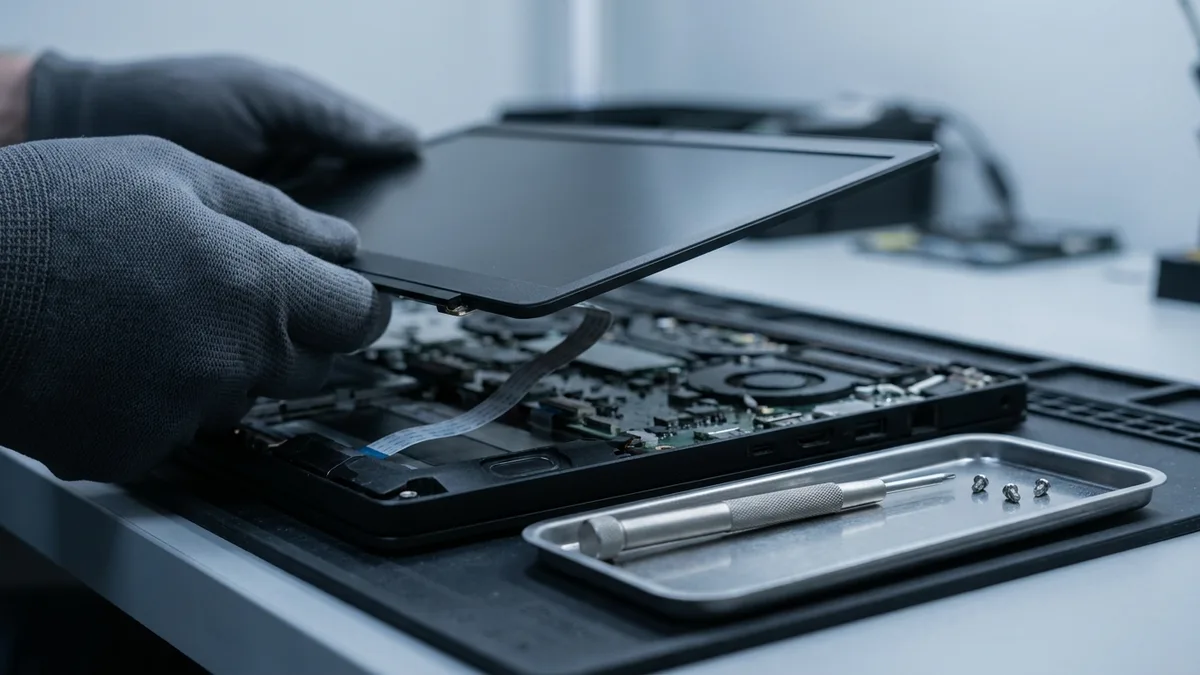
Professional technicians follow a careful process to fix your laptop screen safely and effectively. Here’s an overview of what happens during a pro repair:
- Diagnostic Check: The technician confirms the screen is the source of the issue (for example, by connecting an external monitor to rule out other hardware problems).
- Power Down & Preparation: The laptop is powered off and the battery is removed. The technician uses anti-static tools and precautions to prevent electrical damage before opening the device.
- Disassembly: The technician carefully removes the screen bezel (frame) and unscrews necessary components. The display’s ribbon cable and other connectors are detached from the motherboard.
- Removing the Faulty Screen: The broken screen panel is lifted out, handled gently by the edges. Any brackets or hardware securing the screen are removed and saved for the replacement.
- Installing the New Screen: A compatible replacement screen—matched to your laptop’s model—is fitted into place. The technician reconnects the display cables and secures the new screen with screws or clips, making sure everything is aligned correctly.
- Testing Before Reassembly: Before sealing everything up, the laptop is powered on to test the new screen. The technician checks that the display works properly (correct brightness, no lines or dead pixels) to confirm the issue is resolved.
- Reassembly & Final Check: The laptop is turned off again and reassembled. The bezel and other parts are put back, and all screws are tightened. Finally, the laptop is powered on one more time for a thorough check – the repaired screen is verified for clarity and full functionality (touch, webcam, etc. if applicable).
This careful process ensures your laptop screen is fixed correctly and safely, bringing your device back to like-new condition.
Benefits of Professional Laptop Screen Repair
Trying to fix a screen yourself or ignoring the problem might be tempting, but there are big advantages to using professional services. Here are some benefits Singapore laptop owners get with expert repair:
- The right panel, matched to your model: the fault is confirmed on an external monitor first, so you are not sold a screen when the graphics chip is at fault. They can quickly diagnose and fix the problem correctly on the first try, avoiding the risk of further damage.
- Time Savings: With an expert handling the fix, a laptop screen repair is often completed within the same day. You avoid the long wait of a factory service or the trial-and-error of a DIY attempt, saving you valuable time.
- Safety & Longevity: A professional repair protects your data and other components during the fix. Plus, once your screen is properly repaired, your device is set for a longer lifespan without recurring display problems.
In short, turning to a professional for laptop screen repair ensures a hassle-free experience and reliable results. You get quality service, save time, and gain peace of mind — all while extending the life of your laptop.
Expert Insights: Ensuring Effective Laptop Screen Repair Every Time
Laptop screens are your window to work, entertainment, and creativity — keeping them in good condition is essential. In this guide, we covered how to identify issues early, decide on repair versus replacement wisely, understand the professional repair process, and recognize the benefits of expert service. The key takeaway is that prompt, proper laptop screen repair saves you time, money, and hassle in the long run.
Esmond Service Centre replaces screens at two Singapore branches, Alexandra and Sin Ming, most of them in 1–2 hours and all of them under a 90-day warranty on parts and labour. A poorly executed fix can lead to more problems, but a well-executed laptop screen repair by trusted professionals means your laptop’s display will be as good as new. If you have questions, message us on WhatsApp or walk in at Alexandra or Sin Ming – the diagnostic is free. Staying informed and getting expert help when needed will ensure your laptop screen stays bright and clear whenever you need it.

When to Stop and Bring It In
A cracked panel is a part swap, not a repair you can talk your way through. Stop and bring the laptop in if the glass is broken and flexing, if the image is fine on an external monitor but not on the built-in screen, or if the laptop was dropped and now shows lines that spread. What a screen repair will not fix: if an external monitor shows the same fault, the panel is not the problem — that is the graphics chip or the mainboard, and swapping the screen changes nothing. We will tell you that at the diagnostic rather than after the part is fitted. Walk in at our Alexandra or Sin Ming branch, or see what a screen replacement costs — most are done in 1–2 hours from S$186, with a 90-day warranty on parts and labour. For everyday tips you can also follow our Facebook page, LinkedIn profile or Instagram account.
Reach out to us today to schedule your repair. We’ll get your laptop screen back to perfect condition in no time!

Esmond Service Centre's experienced technicians can diagnose and fix it fast — free diagnostics, repairs from $65.