

📑 On this page
This guide is for parents choosing a standing desk for students who are still growing, and for students setting one up in an HDB bedroom or a dorm room. A height-adjustable desk does two jobs: it can be brought back to the right height as the student grows, which a fixed desk cannot, and it makes it easy to stand for a while between spells of sitting. Do not expect the desk alone to make a student healthier. In Cornell University's field studies of sit-stand workstations, its ergonomics researchers found little evidence of dramatic, widespread benefits, and users stood for 15 minutes or less a day. On HealthHub, a spine surgeon says the key for children is to improve their posture at rest, for example when they are seated, and that standing may not be so problematic.
So the four tips below cover what decides whether the desk helps: when to change position, the heights of the desk and the screen, the accessories and the desk itself. Then comes the repair side: what a spill, a fall, a yanked cable or heat does to the laptop or tablet on the desk, and when to bring it in. Esmond Service Centre completes more than 10,000 repairs a year, backed by our founder's 16 years and counting of hands-on repair experience.
1. Alternate Between Sitting and Standing
Issue: A standing desk left at one height all evening is just a desk, and standing all day is not the answer either. Cornell University's ergonomics guidance says standing to work is more tiring than sitting and puts greater strain on the circulatory system and on the legs and feet, and that prolonged standing at work increases the risk of varicose veins. Long sitting has its own question mark: studies have indicated a possible increase in the risk of coronary heart disease and kidney disease from excessive sitting, though Cornell notes that the data are correlational. And the habit fades: Cornell cites studies in which, after 1 month, a majority of people with sit-stand stations were sitting all the time.
Solution: Switch positions regularly, and move. Cornell's bottom line for computer work is to sit, then every 20 minutes stand for 8 minutes and move for 2; the exact times are not critical, but about every 20 to 30 minutes, take a posture break and stand and move for a couple of minutes. For a student, natural moments are the end of a subject or of a section of a practice paper. Here's how to make it stick:
- Set reminders: A timer set for 20 to 30 minutes is enough; when it goes, stand up or raise the desk, and move. Cornell's guidelines for children explain why the clock matters: the risk of postural problems from computer use depends on how long the child uses the computer without a rest break, and they suggest watching the clock or using software that gives on-screen alerts to take a break.
- Listen to your body: If you feel discomfort while standing, sit down for a bit (and vice versa). There's no benefit in pushing through pain – the goal is to feel better and stay productive.
- Take quick breaks: Cornell is clear that simply standing is not enough: movement gets blood circulating through the muscles, and just walking around is sufficient, with no need for vigorous exercise. A walk to the kitchen to refill a water bottle counts, and leaving the bottle there, not beside the laptop, also keeps a drink out of the keyboard.
What changing position will and will not fix: Cornell points to a large body of research showing that frequent microbreaks improve comfort and work performance and reduce the risk of musculoskeletal injuries, so the point of switching is the break and the movement, not the standing itself. Switching will not fix a desk or a screen at the wrong height, which is the next tip, and no amount of switching undoes a slouch that the chair, the desk and the screen still force on the student.
2. Maintain Proper Ergonomics (Posture & Desk Height)
Issue: Students grow, and a desk set right for the student a year ago may be wrong today. On HealthHub, in an article from the Health Promotion Board, Dr Lau Leok Lim, a consultant in spine surgery at the National University Health System (NUHS), says poor posture often arises from poor ergonomic design, such as an unsuitable study desk, and the article asks parents to pay close attention, because children are constantly growing and need their desk heights adjusted accordingly. Standard furniture does not start from a student's size either: SingHealth's HealthXchange notes that the typical 750 mm office table was initially designed to suit people about 1.80 m tall. A laptop adds a second problem. Its screen is joined to its keyboard, so with the keyboard at elbow height the screen sits below eye level, and Cornell notes that a screen that is too low bends a child's neck forward.
Solution: Set up your workstation around the student, not the furniture, in this order, and check it again as they grow:
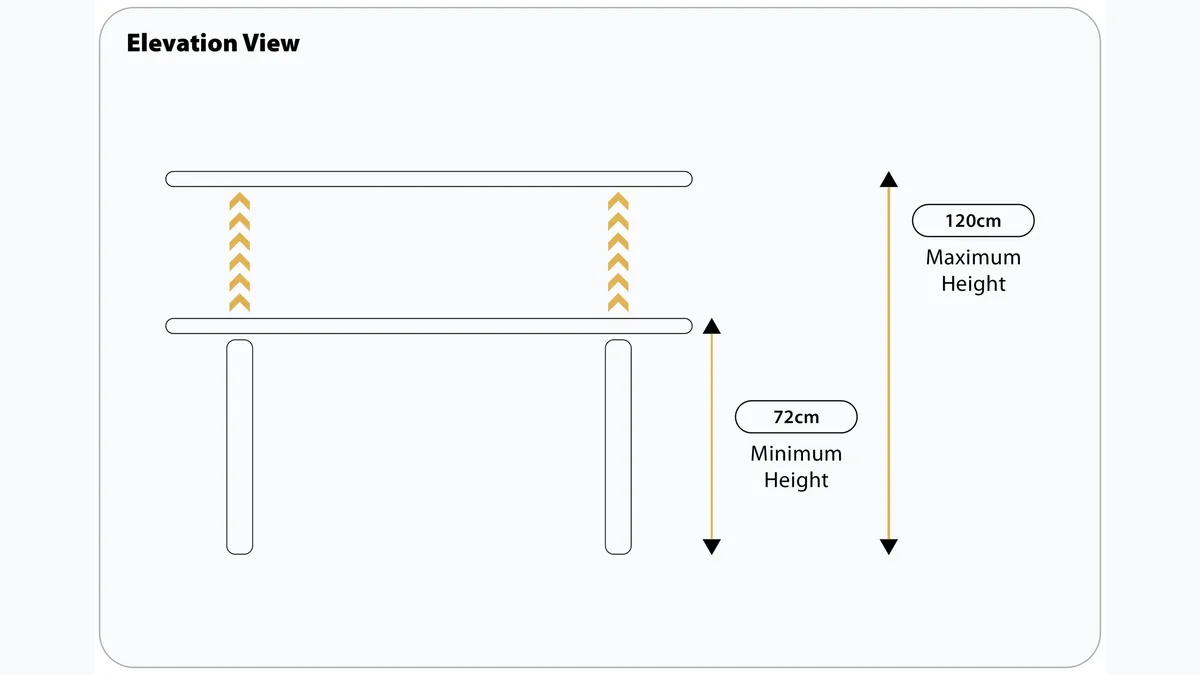
- Step 1 — desk height: With the student seated, bring the desk, or the keyboard, to elbow height, so the elbows form about a 90-degree angle and stay close to the body while typing, as the occupational therapists at Singapore General Hospital (SGH) advise. Then check the feet: flat on the floor or on a footrest, never dangling. Check the range against the student before you buy: the Vival desk Esmond Service Centre sells travels from 72 cm to 120 cm, so first measure the student's seated elbow height from the floor. If it is below 72 cm, the desk cannot come down far enough; raise the chair to the desk instead and put a footrest under the feet.
- Step 2 — monitor position: The top of the screen should be at, or slightly below, eye level and an arm's length away, SGH's therapists advise, and the screen should not face a window or stand in front of one; keep the light to the side. A laptop flat on the desk cannot reach that height: put it on a stand or riser and use a separate keyboard and mouse, which SGH recommends whenever a laptop is used for more than an hour. A tablet lying flat on the desk has the same problem, so prop it up in a stand.
- Step 3 — standing posture: To stand, raise the whole desk until the keyboard is at elbow height again, so a screen standing on the desktop rises with it. Raising the keyboard alone is not enough: Cornell warns that when the desk goes up for the keyboard and mouse, the screen has to go up too, or the neck bends forward, and that people working on their feet soon end up leaning, which compromises their wrist posture. Stand with your weight on both feet, not leaning on the desk.
Then re-check all three heights as the student grows. HealthHub's point is that children's desk heights need adjusting as they grow, and Cornell's guidelines for children list the furniture that keeps a workstation adjustable as the child grows, starting with a height-adjustable chair with good back support. On a height-adjustable desk, the re-check is a quick change; on a fixed desk, the chair and a footrest do the adjusting. For numbers from the student's own height, use our standing desk height calculator. What no desk height fixes: HealthHub lists reading, texting or gaming on a mobile phone with the neck flexed excessively for prolonged hours among the bad habits behind poor posture.
3. Use Supportive Accessories for Comfort
Issue: The accessories fill two gaps that the desk leaves. The first is standing itself: Cornell notes that standing puts greater strain on the circulatory system and on the legs and feet, which is why industry gives people who work standing anti-fatigue surfaces to stand on, anti-fatigue footwear and chairs for their rest breaks. The second is short legs. Cornell describes young children at a computer sitting too low, with their legs and feet dangling, and says they need a chair that raises them to the correct height and gives their feet a stable platform. A student whose chair is raised to suit the desk meets the same problem.
Solution: Three accessories close those gaps. If the student works on a laptop, the stand and separate keyboard from Step 2 come first; then:
- Anti-fatigue mat: For the standing spells, a cushioned mat under the feet is the home version of the anti-fatigue surfaces that, Cornell notes, industry gives people who stand to work. Put it where the student stands, with its edges lying flat, so that a foot or the chair's wheels do not catch on it.
- Supportive shoes: Alongside the surfaces to stand on, Cornell notes, industry also gives people who stand to work anti-fatigue footwear. At home, a pair of cushioned indoor shoes kept by the desk is the equivalent for a student who stands for longer spells.
- Height-adjustable chair and a footrest: The sitting spells need a proper chair. Cornell's guidelines for children put a height-adjustable chair with a comfortable seat and good back support first among the furniture that keeps a workstation adjustable as the child grows. If raising the chair to suit the desk leaves the feet off the floor, add a footrest: Cornell asks for the feet firmly on the floor or a footrest, and the therapists at SGH say not to let the feet dangle. Our guide to a chair for work covers the chair's own adjustments.
What these accessories will and will not fix: The mat and the shoes make the standing spells more comfortable; they do not make standing for hours a good idea. The chair and the footrest fix a student who sits too low or with feet dangling; they do not fix a laptop screen that sits below eye level, which is the job of the stand and separate keyboard in Step 2. And none of them keeps a drink out of the keyboard; only keeping the bottle off the desk does that.
4. How Do You Choose the Right Standing Desk for a Student's Space?
Issue: In an HDB bedroom or a dorm room, the wrong desk shows itself quickly: too big for the space, unsteady when raised, or with a height range that misses the student's own heights. Cornell's guidelines for children ask for the computer to be placed on a stable worksurface, and a laptop at standing height has further to fall if the desk is knocked or a cable is caught.
Solution: Choosing a standing desk for students comes down to three checks: the room, the steadiness and the support after you buy:
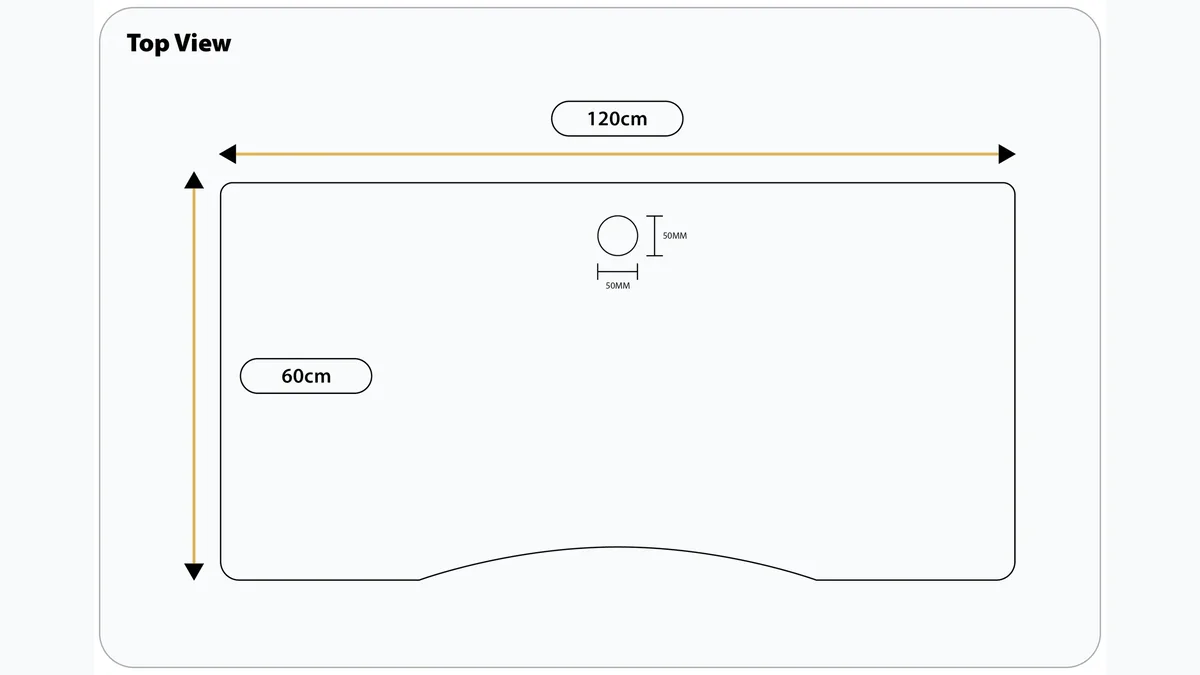
- Size for your space: Measure the study corner, leave room for the chair to pull back, and check that nothing above the desk, such as a shelf or a window ledge, is in the way when it rises. The Vival dual-motor standing desk has a 120×60 cm top, which leaves room for a laptop and your notes.
- Stability and capacity: Look for a sturdy frame, a smooth lift and a load limit, as the maker states it, that covers what will sit on the desk. The Vival desk is dual-motor, and its dual-motor mechanism gives smooth, stable height adjustment. Before raising the desk, which goes up to 120 cm, move the laptop back from the edge, so that a knock or a caught cable does not send it over.
- Warranty and support: Buy where you can get help locally if something goes wrong. The Vival desk carries a 1-year standard warranty, with local support through Esmond Service Centre; the full terms are on our Vival warranty policy page.
Plan the power point before the desk arrives. A socket beside the desk keeps the charger cable from crossing the floor, where a foot or a chair can catch it and pull the laptop down; in its safety information, Lenovo asks for power cords to be routed so that they will not be walked on, tripped over or pinched by objects. Leave the cable enough slack to reach the desk's highest setting without going tight, and let it run in gentle curves: Apple notes that a cable bent repeatedly in the same spot can become weak or brittle, and says to stop using a charge cable that becomes frayed or otherwise damaged. When the charger goes into a school bag, do not wrap its cord around the adapter; Lenovo warns that this can stress the cord so that it frays, cracks or crimps. Our desktop cable management tips cover the routing.
When to Stop Adjusting Your Desk and Seek Professional Help
Everything above is about the set-up; this part is about the student. A desk is a way to study comfortably, not a treatment. HealthHub's warning signs of postural kyphosis, a rounded back, are shoulder blades at different heights or positions, a head often bent forward compared with the rest of the body, and, when the child bends forward, an upper back that looks higher or a visible hump. If a child keeps complaining of stiffness, pain or numbness in the shoulders, neck or back, HealthHub says to watch what they are doing. In its safety guide for iPad, Apple draws its own line: if repetitive activities such as typing, swiping or playing games bring discomfort in the hands, arms, wrists, shoulders, neck or other parts of the body, stop using the iPad and consult a physician. Stop adjusting the desk and have a doctor check any of those signs: HealthHub notes that postural kyphosis can usually be treated with physical therapy, and that left untreated, such conditions may worsen and lead to degenerative conditions of the spine in adulthood. For the laptop or tablet on the desk, the stop line is in the next section.
Laptop and Tablet Care at a Student's Desk: Spills, Falls, Cables and Heat
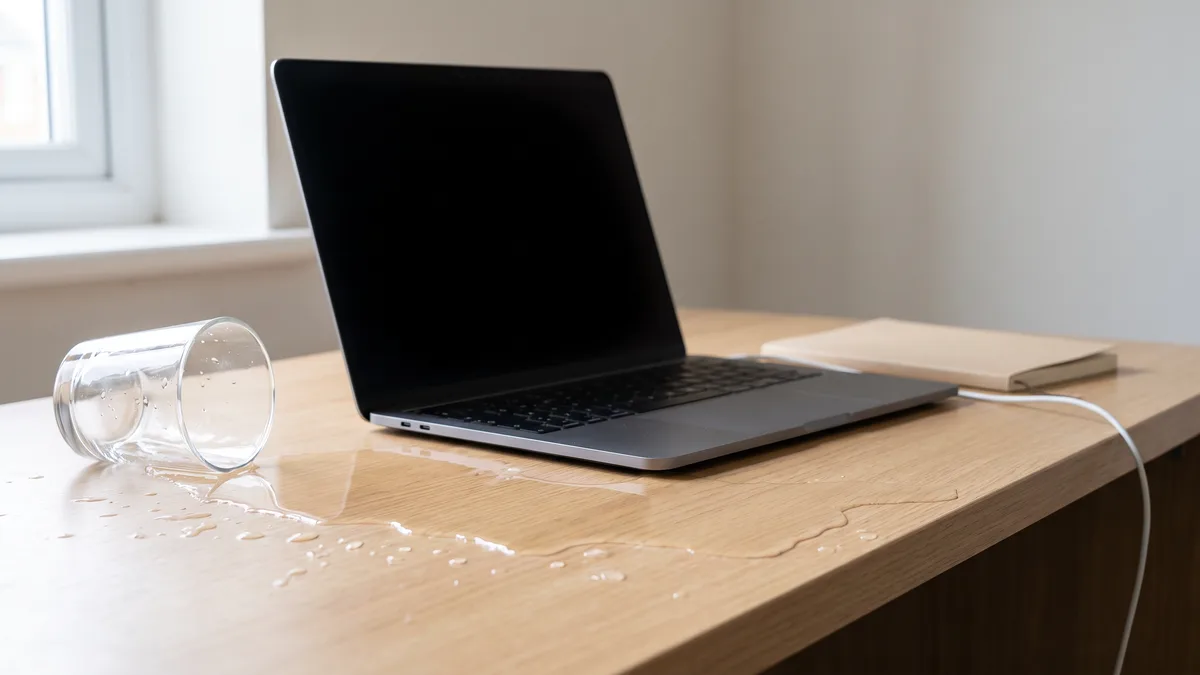
If a drink spills: for a laptop, Lenovo's user guide says to unplug the power adapter and turn the computer off immediately, to wait until you are certain all the liquid is dry before turning it on, and not to try to drain it by turning it over. For an iPad, Apple says to unplug all cables and not to charge it until it is completely dry, allowing at least 5 hours, and not to dry it with an external heat source. These steps limit the damage; they cannot clean out what the liquid leaves inside (see why a wet laptop needs cleaning).
Falls and heat: Apple warns that an iPad can be damaged if it is dropped, says to stop using one you suspect is damaged, and not to use one with a cracked screen. For heat, keep the tablet out of the sun that comes through the window: an iPad left in direct sunlight for extended periods can stop charging, dim its screen and show a temperature warning.
Stop and bring it in, rather than testing it again, if liquid got inside; if it fell and the screen cracked or the lid no longer closes evenly; if, after a yanked cable, it charges only with the plug held at an angle, or not at all (see laptop charging repair); or if the fans keep running hard on light work even after a restart. A laptop that seems not to power on is often a dead screen showing black; if it will not power on even on the charger, it is almost always a board fault.
Check your cover first, and know the cost of getting it wrong: Apple's warranty covers manufacturing issues for one year from purchase, not accidental damage, so after a spill or a fall, check whether the device has an AppleCare plan with accidental damage protection; a fault that is not accidental goes to the maker first while the device is in warranty, which is the cheaper route for you. If it is a school Personal Learning Device (PLD), follow the school's own device guide first: one Singapore secondary school's guide lists spills and drops under the device's insurance, and says that cover applies only where the student has taken reasonable precautions to safeguard the device. Lenovo warns that leaving a wet computer on might make it unusable, and liquid damage with several failures at once is one of the cases where Esmond Service Centre advises against repairing at all. Laptop diagnosis is free: start with laptop water damage repair, laptop overheating and fan repair, laptop repair or iPad repair.
Where to See the Desk, and Where to Bring a Damaged Laptop or Tablet
Esmond Service Centre is Singapore's exclusive distributor of the Vival dual-motor standing desk. Read the full specification on our Vival standing desk page, see the desk in person at our Sin Ming branch with the student's measurements in hand, and order online at projectvival.com. If a laptop or tablet on the desk has had a spill, a fall or a yanked cable, bring it to either of our branches, at Alexandra Retail Centre and Midview City at Sin Ming, or ask for a repair quote first.

Esmond Service Centre's experienced technicians can diagnose and fix it fast — free diagnostics, repairs from $65.